2 - Schema API
Schema(图模式)REST 接口:查询图的完整模式定义,包括属性键、顶点标签、边标签和索引标签的统一视图。
1.1 Schema
HugeGraph 提供单一接口获取某个图的全部 Schema 信息,包括:PropertyKey、VertexLabel、EdgeLabel 和 IndexLabel。
Method & Url
GET http://localhost:8080/graphspaces/DEFAULT/graphs/{graph_name}/schema

e.g: GET http://localhost:8080/graphspaces/DEFAULT/graphs/hugegraph/schema
Response Status
Response Body
{
    "propertykeys": [
        {
            "id": 7,
            "name": "price",
            "data_type": "DOUBLE",
            "cardinality": "SINGLE",
            "aggregate_type": "NONE",
            "write_type": "OLTP",
            "properties": [],
            "status": "CREATED",
            "user_data": {
                "~create_time": "2023-05-08 17:49:05.316"
            }
        },
        {
            "id": 6,
            "name": "date",
            "data_type": "TEXT",
            "cardinality": "SINGLE",
            "aggregate_type": "NONE",
            "write_type": "OLTP",
            "properties": [],
            "status": "CREATED",
            "user_data": {
                "~create_time": "2023-05-08 17:49:05.309"
            }
        },
        {
            "id": 3,
            "name": "city",
            "data_type": "TEXT",
            "cardinality": "SINGLE",
            "aggregate_type": "NONE",
            "write_type": "OLTP",
            "properties": [],
            "status": "CREATED",
            "user_data": {
                "~create_time": "2023-05-08 17:49:05.287"
            }
        },
        {
            "id": 2,
            "name": "age",
            "data_type": "INT",
            "cardinality": "SINGLE",
            "aggregate_type": "NONE",
            "write_type": "OLTP",
            "properties": [],
            "status": "CREATED",
            "user_data": {
                "~create_time": "2023-05-08 17:49:05.280"
            }
        },
        {
            "id": 5,
            "name": "lang",
            "data_type": "TEXT",
            "cardinality": "SINGLE",
            "aggregate_type": "NONE",
            "write_type": "OLTP",
            "properties": [],
            "status": "CREATED",
            "user_data": {
                "~create_time": "2023-05-08 17:49:05.301"
            }
        },
        {
            "id": 4,
            "name": "weight",
            "data_type": "DOUBLE",
            "cardinality": "SINGLE",
            "aggregate_type": "NONE",
            "write_type": "OLTP",
            "properties": [],
            "status": "CREATED",
            "user_data": {
                "~create_time": "2023-05-08 17:49:05.294"
            }
        },
        {
            "id": 1,
            "name": "name",
            "data_type": "TEXT",
            "cardinality": "SINGLE",
            "aggregate_type": "NONE",
            "write_type": "OLTP",
            "properties": [],
            "status": "CREATED",
            "user_data": {
                "~create_time": "2023-05-08 17:49:05.250"
            }
        }
    ],
    "vertexlabels": [
        {
            "id": 1,
            "name": "person",
            "id_strategy": "PRIMARY_KEY",
            "primary_keys": [
                "name"
            ],
            "nullable_keys": [
                "age",
                "city"
            ],
            "index_labels": [
                "personByAge",
                "personByCity",
                "personByAgeAndCity"
            ],
            "properties": [
                "name",
                "age",
                "city"
            ],
            "status": "CREATED",
            "ttl": 0,
            "enable_label_index": true,
            "user_data": {
                "~create_time": "2023-05-08 17:49:05.336"
            }
        },
        {
            "id": 2,
            "name": "software",
            "id_strategy": "CUSTOMIZE_NUMBER",
            "primary_keys": [],
            "nullable_keys": [],
            "index_labels": [
                "softwareByPrice"
            ],
            "properties": [
                "name",
                "lang",
                "price"
            ],
            "status": "CREATED",
            "ttl": 0,
            "enable_label_index": true,
            "user_data": {
                "~create_time": "2023-05-08 17:49:05.347"
            }
        }
    ],
    "edgelabels": [
        {
            "id": 1,
            "name": "knows",
            "source_label": "person",
            "target_label": "person",
            "frequency": "SINGLE",
            "sort_keys": [],
            "nullable_keys": [],
            "index_labels": [
                "knowsByWeight"
            ],
            "properties": [
                "weight",
                "date"
            ],
            "status": "CREATED",
            "ttl": 0,
            "enable_label_index": true,
            "user_data": {
                "~create_time": "2023-05-08 17:49:08.437"
            }
        },
        {
            "id": 2,
            "name": "created",
            "source_label": "person",
            "target_label": "software",
            "frequency": "SINGLE",
            "sort_keys": [],
            "nullable_keys": [],
            "index_labels": [
                "createdByDate",
                "createdByWeight"
            ],
            "properties": [
                "weight",
                "date"
            ],
            "status": "CREATED",
            "ttl": 0,
            "enable_label_index": true,
            "user_data": {
                "~create_time": "2023-05-08 17:49:08.446"
            }
        }
    ],
    "indexlabels": [
        {
            "id": 1,
            "name": "personByAge",
            "base_type": "VERTEX_LABEL",
            "base_value": "person",
            "index_type": "RANGE_INT",
            "fields": [
                "age"
            ],
            "status": "CREATED",
            "user_data": {
                "~create_time": "2023-05-08 17:49:05.375"
            }
        },
        {
            "id": 2,
            "name": "personByCity",
            "base_type": "VERTEX_LABEL",
            "base_value": "person",
            "index_type": "SECONDARY",
            "fields": [
                "city"
            ],
            "status": "CREATED",
            "user_data": {
                "~create_time": "2023-05-08 17:49:06.898"
            }
        },
        {
            "id": 3,
            "name": "personByAgeAndCity",
            "base_type": "VERTEX_LABEL",
            "base_value": "person",
            "index_type": "SECONDARY",
            "fields": [
                "age",
                "city"
            ],
            "status": "CREATED",
            "user_data": {
                "~create_time": "2023-05-08 17:49:07.407"
            }
        },
        {
            "id": 4,
            "name": "softwareByPrice",
            "base_type": "VERTEX_LABEL",
            "base_value": "software",
            "index_type": "RANGE_DOUBLE",
            "fields": [
                "price"
            ],
            "status": "CREATED",
            "user_data": {
                "~create_time": "2023-05-08 17:49:07.916"
            }
        },
        {
            "id": 5,
            "name": "createdByDate",
            "base_type": "EDGE_LABEL",
            "base_value": "created",
            "index_type": "SECONDARY",
            "fields": [
                "date"
            ],
            "status": "CREATED",
            "user_data": {
                "~create_time": "2023-05-08 17:49:08.454"
            }
        },
        {
            "id": 6,
            "name": "createdByWeight",
            "base_type": "EDGE_LABEL",
            "base_value": "created",
            "index_type": "RANGE_DOUBLE",
            "fields": [
                "weight"
            ],
            "status": "CREATED",
            "user_data": {
                "~create_time": "2023-05-08 17:49:08.963"
            }
        },
        {
            "id": 7,
            "name": "knowsByWeight",
            "base_type": "EDGE_LABEL",
            "base_value": "knows",
            "index_type": "RANGE_DOUBLE",
            "fields": [
                "weight"
            ],
            "status": "CREATED",
            "user_data": {
                "~create_time": "2023-05-08 17:49:09.473"
            }
        }
    ]
}
8 - Vertex API
Vertex(顶点)REST 接口:创建、查询、更新和删除图中的顶点数据,支持批量操作和条件过滤。
2.1 Vertex
顶点类型中的 Id 策略决定了顶点的 Id 类型,其对应的 id 类型如下:
| Id_Strategy | id type |
|---|
| AUTOMATIC | number |
| PRIMARY_KEY | string |
| CUSTOMIZE_STRING | string |
| CUSTOMIZE_NUMBER | number |
| CUSTOMIZE_UUID | uuid |
顶点的 GET/PUT/DELETE API 中 url 的 id 部分应该传入带有类型信息的 id 值,这个类型信息通过 json 串是否带引号来表示,也就是说:
- 当 id 类型为
number 时,url 中的 id 不带引号,例如 xxx/vertices/123456 - 当 id 类型为
string 时,url 中的 id 带引号,例如 xxx/vertices/"123456"
接下来的示例需要先根据以下 groovy 脚本创建图 schema
schema.propertyKey("name").asText().ifNotExist().create();
schema.propertyKey("age").asInt().ifNotExist().create();
schema.propertyKey("city").asText().ifNotExist().create();
schema.propertyKey("weight").asDouble().ifNotExist().create();
schema.propertyKey("lang").asText().ifNotExist().create();
schema.propertyKey("price").asDouble().ifNotExist().create();
schema.propertyKey("hobby").asText().valueList().ifNotExist().create();

schema.vertexLabel("person").properties("name", "age", "city", "weight", "hobby").primaryKeys("name").nullableKeys("age", "city", "weight", "hobby").ifNotExist().create();
schema.vertexLabel("software").properties("name", "lang", "price").primaryKeys("name").nullableKeys("lang", "price").ifNotExist().create();

schema.indexLabel("personByAge").onV("person").by("age").range().ifNotExist().create();
2.1.1 创建一个顶点
Params
路径参数说明:
- graphspace: 图空间名称
- graph: 图名称
Method & Url
POST http://localhost:8080/graphspaces/DEFAULT/graphs/hugegraph/graph/vertices
Request Body
{
    "label": "person",
    "properties": {
        "name": "marko",
        "age": 29
    }
}
Response Status
Response Body
{
    "id": "1:marko",
    "label": "person",
    "type": "vertex",
    "properties": {
        "name": "marko",
        "age": 29
    }
}
2.1.2 创建多个顶点
Params
路径参数说明:
- graphspace: 图空间名称
- graph: 图名称
Method & Url
POST http://localhost:8080/graphspaces/DEFAULT/graphs/hugegraph/graph/vertices/batch
Request Body
[
    {
        "label": "person",
        "properties": {
            "name": "marko",
            "age": 29
        }
    },
    {
        "label": "software",
        "properties": {
            "name": "ripple",
            "lang": "java",
            "price": 199
        }
    }
]
Response Status
Response Body
[
    "1:marko",
    "2:ripple"
]
2.1.3 更新顶点属性
Params
路径参数说明:
- graphspace: 图空间名称
- graph: 图名称
- id: 顶点 id,需要包含引号,例如"1:marko"
Method & Url
PUT http://127.0.0.1:8080/graphspaces/DEFAULT/graphs/hugegraph/graph/vertices/"1:marko"?action=append
Request Body
{
    "label": "person",
    "properties": {
        "age": 30,
        "city": "Beijing"
    }
}
注意:属性的取值有三种类别,分别为 single、set 和 list。single 表示增加或更新属性值,set 或 list 表示追加属性值。
Response Status
Response Body
{
    "id": "1:marko",
    "label": "person",
    "type": "vertex",
    "properties": {
        "name": "marko",
        "age": 30,
        "city": "Beijing"
    }
}
2.1.4 批量更新顶点属性
功能说明
批量更新顶点的属性时,可以选择多种更新策略,如下:
- SUM: 数值累加
- BIGGER: 原值和新值 (数字、日期) 取更大的
- SMALLER: 原值和新值 (数字、日期) 取更小的
- UNION: Set 属性取并集
- INTERSECTION: Set 属性取交集
- APPEND: List 属性追加元素
- ELIMINATE: List/Set属性删除元素
- OVERRIDE: 覆盖已有属性,如果新属性为 null,则仍然使用旧属性
假设原顶点的属性如下:
{
    "vertices": [
        {
            "id": "2:lop",
            "label": "software",
            "type": "vertex",
            "properties": {
                "name": "lop",
                "lang": "java",
                "price": 328
            }
        },
        {
            "id": "1:josh",
            "label": "person",
            "type": "vertex",
            "properties": {
                "name": "josh",
                "age": 32,
                "city": "Beijing",
                "weight": 0.1,
                "hobby": [
                    "reading",
                    "football"
                ]
            }
        }
    ]
}
通过以下命令新增顶点:
curl -H "Content-Type: application/json" -d '[{"label":"person","properties":{"name":"josh","age":32,"city":"Beijing","weight":0.1,"hobby":["reading","football"]}},{"label":"software","properties":{"name":"lop","lang":"java","price":328}}]' http://127.0.0.1:8080/graphspaces/DEFAULT/graphs/hugegraph/graph/vertices/batch
Params
路径参数说明:
- graphspace: 图空间名称
- graph: 图名称
Method & Url
PUT http://127.0.0.1:8080/graphspaces/DEFAULT/graphs/hugegraph/graph/vertices/batch
Request Body
{
    "vertices": [
        {
            "label": "software",
            "type": "vertex",
            "properties": {
                "name": "lop",
                "lang": "c++",
                "price": 299
            }
        },
        {
            "label": "person",
            "type": "vertex",
            "properties": {
                "name": "josh",
                "city": "Shanghai",
                "weight": 0.2,
                "hobby": [
                    "swimming"
                ]
            }
        }
    ],
    "update_strategies": {
        "price": "BIGGER",
        "age": "OVERRIDE",
        "city": "OVERRIDE",
        "weight": "SUM",
        "hobby": "UNION"
    },
    "create_if_not_exist": true
}
Response Status
Response Body
{
    "vertices": [
        {
            "id": "2:lop",
            "label": "software",
            "type": "vertex",
            "properties": {
                "name": "lop",
                "lang": "c++",
                "price": 328
            }
        },
        {
            "id": "1:josh",
            "label": "person",
            "type": "vertex",
            "properties": {
                "name": "josh",
                "age": 32,
                "city": "Shanghai",
                "weight": 0.3,
                "hobby": [
                    "reading",
                    "football",
                    "swimming"
                ]
            }
        }
    ]
}
结果分析如下:
- lang 属性未指定更新策略,直接用新值覆盖旧值,无论新值是否为 null;
- price 属性指定 BIGGER 的更新策略,旧属性值为 328,新属性值为 299,所以仍然保留了旧属性值 328;
- age 属性指定 OVERRIDE 更新策略,而新属性值中未传入 age,相当于 age 为 null,所以仍然保留了原属性值 32;
- city 属性也指定了 OVERRIDE 更新策略,且新属性值不为 null,所以覆盖了旧值;
- weight 属性指定了 SUM 更新策略,旧属性值为 0.1,新属性值为 0.2,最后的值为 0.3;
- hobby 属性(基数为 Set)指定了 UNION 更新策略,所以新值与旧值取了并集;
其他更新策略的使用方式与此类似,此处不再详述。
2.1.5 删除顶点属性
Params
路径参数说明:
- graphspace: 图空间名称
- graph: 图名称
- id: 顶点 id,需要包含引号,例如"1:marko"
Method & Url
PUT http://127.0.0.1:8080/graphspaces/DEFAULT/graphs/hugegraph/graph/vertices/"1:marko"?action=eliminate
Request Body
{
    "label": "person",
    "properties": {
        "city": "Beijing"
    }
}
注意:这里会直接删除属性(删除 key 和所有 value),无论其属性的取值是 single、set 或 list。
Response Status
Response Body
{
    "id": "1:marko",
    "label": "person",
    "type": "vertex",
    "properties": {
        "name": "marko",
        "age": 30
    }
}
2.1.6 获取符合条件的顶点
Params
路径参数说明:
- graphspace: 图空间名称
- graph: 图名称
请求参数说明:
- label: 顶点的类型
- properties: 属性键值对(查询属性的前提是该属性已经建立了索引)
- limit: 查询结果的最大数目
- page: 分页的页号
以上参数都是可选的,但如果提供了 page 参数,就必须同时提供 limit 参数,并且不能再提供其他参数。label, properties和limit之间可以任意组合。
属性键值对由属性名称和属性值组成 JSON 格式的对象,可以使用多个属性键值对作为查询条件,属性值支持精确匹配和范围匹配,精确匹配的形式如properties={"age":29},范围匹配的形式如properties={"age":"P.gt(29)"},范围匹配支持以下表达式:
| 表达式 | 说明 |
|---|
| P.eq(number) | 属性值等于 number 的顶点 |
| P.neq(number) | 属性值不等于 number 的顶点 |
| P.lt(number) | 属性值小于 number 的顶点 |
| P.lte(number) | 属性值小于等于 number 的顶点 |
| P.gt(number) | 属性值大于 number 的顶点 |
| P.gte(number) | 属性值大于等于 number 的顶点 |
| P.between(number1,number2) | 属性值大于等于 number1 且小于 number2 的顶点 |
| P.inside(number1,number2) | 属性值大于 number1 且小于 number2 的顶点 |
| P.outside(number1,number2) | 属性值小于 number1 且大于 number2 的顶点 |
| P.within(value1,value2,value3,…) | 属性值等于任何一个给定 value 的顶点 |
查询所有 age 为 29 且 label 为 person 的顶点
Method & Url
GET http://localhost:8080/graphspaces/DEFAULT/graphs/hugegraph/graph/vertices?label=person&properties={"age":29}&limit=1
Response Status
Response Body
{
    "vertices": [
        {
            "id": "1:marko",
            "label": "person",
            "type": "vertex",
            "properties": {
                "name": "marko",
                "age": 30
            }
        }
    ]
}
分页查询所有顶点,获取第一页(page 不带参数值),限定 3 条
通过以下命令新增顶点:
curl -H "Content-Type: application/json" -d '[{"label":"person","properties":{"name":"peter","age":29,"city":"Shanghai"}},{"label":"person","properties":{"name":"vadas","age":27,"city":"Hongkong"}}]' http://localhost:8080/graphspaces/DEFAULT/graphs/hugegraph/graph/vertices/batch
Method & Url
GET http://localhost:8080/graphspaces/DEFAULT/graphs/hugegraph/graph/vertices?page&limit=3
Response Status
Response Body
{
    "vertices": [
        {
            "id": "2:lop",
            "label": "software",
            "type": "vertex",
            "properties": {
                "name": "lop",
                "lang": "c++",
                "price": 328
            }
        },
        {
            "id": "1:josh",
            "label": "person",
            "type": "vertex",
            "properties": {
                "name": "josh",
                "age": 32,
                "city": "Shanghai",
                "weight": 0.3,
                "hobby": [
                    "reading",
                    "football",
                    "swimming"
                ]
            }
        },
        {
            "id": "1:marko",
            "label": "person",
            "type": "vertex",
            "properties": {
                "name": "marko",
                "age": 30
            }
        }
    ],
    "page": "CIYxOnBldGVyAAAAAAAAAAM="
}
返回的 body 里面是带有下一页的页号信息的,"page": "CIYxOnBldGVyAAAAAAAAAAM=",在查询下一页的时候将该值赋给 page 参数。
分页查询所有顶点,获取下一页(page 带上上一页返回的 page 值),限定 3 条
Method & Url
GET http://localhost:8080/graphspaces/DEFAULT/graphs/hugegraph/graph/vertices?page=CIYxOnBldGVyAAAAAAAAAAM=&limit=3
Response Status
Response Body
{
    "vertices": [
        {
            "id": "1:peter",
            "label": "person",
            "type": "vertex",
            "properties": {
                "name": "peter",
                "age": 29,
                "city": "Shanghai"
            }
        },
        {
            "id": "1:vadas",
            "label": "person",
            "type": "vertex",
            "properties": {
                "name": "vadas",
                "age": 27,
                "city": "Hongkong"
            }
        },
        {
            "id": "2:ripple",
            "label": "software",
            "type": "vertex",
            "properties": {
                "name": "ripple",
                "lang": "java",
                "price": 199
            }
        }
    ],
    "page": null
}
当"page": null时,表示已经没有下一页了(注:如果后端使用的是 Cassandra,为了提高性能,当返回的页数刚好是最后一页时,返回的 page 值可能不为空,但是如果用这个 page 值再请求下一页数据时,就会返回 空数据 和 page = null,其他情况也类似)
2.1.7 根据 Id 获取顶点
Params
路径参数说明:
- graphspace: 图空间名称
- graph: 图名称
- id: 顶点 id,需要包含引号,例如"1:marko"
Method & Url
GET http://localhost:8080/graphspaces/DEFAULT/graphs/hugegraph/graph/vertices/"1:marko"
Response Status
Response Body
{
    "id": "1:marko",
    "label": "person",
    "type": "vertex",
    "properties": {
        "name": "marko",
        "age": 30
    }
}
2.1.8 根据 Id 删除顶点
Params
路径参数说明:
- graphspace: 图空间名称
- graph: 图名称
- id: 顶点 id,需要包含引号,例如"1:marko"
请求参数说明:
仅根据 Id 删除顶点
Method & Url
DELETE http://localhost:8080/graphspaces/DEFAULT/graphs/hugegraph/graph/vertices/"1:marko"
Response Status
根据 Label+Id 删除顶点
通过指定 Label 参数和 Id 来删除顶点时,一般来说其性能比仅根据 Id 删除会更好。
Method & Url
DELETE http://localhost:8080/graphspaces/DEFAULT/graphs/hugegraph/graph/vertices/"1:marko"?label=person
Response Status
9 - Edge API
Edge(边)REST 接口:创建、查询、更新和删除顶点之间的关系数据,支持批量操作和方向查询。
2.2 Edge
顶点 id 格式的修改也影响到了边的 id 以及源顶点和目标顶点 id 的格式
EdgeId 是由 src-vertex-id + direction + label + sort-values + tgt-vertex-id 拼接而成,但是这里的顶点 id 类型不是通过引号区分的,而是根据前缀区分:
- 当 id 类型为 number 时,EdgeId 的顶点 id 前有一个前缀
L ,形如 “L123456>1»L987654” - 当 id 类型为 string 时,EdgeId 的顶点 id 前有一个前缀
S ,形如 “S1:peter>1»S2:lop”
接下来的示例需要先根据以下 groovy 脚本创建图 schema
import org.apache.hugegraph.HugeFactory
import org.apache.tinkerpop.gremlin.structure.T

conf = "conf/graphs/hugegraph.properties"
graph = HugeFactory.open(conf)
schema = graph.schema()

schema.propertyKey("name").asText().ifNotExist().create()
schema.propertyKey("age").asInt().ifNotExist().create()
schema.propertyKey("city").asText().ifNotExist().create()
schema.propertyKey("weight").asDouble().ifNotExist().create()
schema.propertyKey("lang").asText().ifNotExist().create()
schema.propertyKey("date").asText().ifNotExist().create()
schema.propertyKey("price").asInt().ifNotExist().create()

schema.vertexLabel("person").properties("name", "age", "city").primaryKeys("name").ifNotExist().create()
schema.vertexLabel("software").properties("name", "lang", "price").primaryKeys("name").ifNotExist().create()
schema.indexLabel("personByCity").onV("person").by("city").secondary().ifNotExist().create()
schema.indexLabel("personByAgeAndCity").onV("person").by("age", "city").secondary().ifNotExist().create()
schema.indexLabel("softwareByPrice").onV("software").by("price").range().ifNotExist().create()
schema.edgeLabel("knows").sourceLabel("person").targetLabel("person").properties("date", "weight").ifNotExist().create()
schema.edgeLabel("created").sourceLabel("person").targetLabel("software").properties("date", "weight").ifNotExist().create()
schema.indexLabel("createdByDate").onE("created").by("date").secondary().ifNotExist().create()
schema.indexLabel("createdByWeight").onE("created").by("weight").range().ifNotExist().create()
schema.indexLabel("knowsByWeight").onE("knows").by("weight").range().ifNotExist().create()

marko = graph.addVertex(T.label, "person", "name", "marko", "age", 29, "city", "Beijing")
vadas = graph.addVertex(T.label, "person", "name", "vadas", "age", 27, "city", "Hongkong")
lop = graph.addVertex(T.label, "software", "name", "lop", "lang", "java", "price", 328)
josh = graph.addVertex(T.label, "person", "name", "josh", "age", 32, "city", "Beijing")
ripple = graph.addVertex(T.label, "software", "name", "ripple", "lang", "java", "price", 199)
peter = graph.addVertex(T.label, "person", "name", "peter", "age", 35, "city", "Shanghai")

graph.tx().commit()
g = graph.traversal()
2.2.1 创建一条边
Params
路径参数说明:
- graphspace: 图空间名称
- graph:待操作的图
请求体说明:
- label:边类型名称,必填
- outV:源顶点 id,必填
- inV:目标顶点 id,必填
- outVLabel:源顶点类型,必填
- inVLabel:目标顶点类型,必填
- properties: 边关联的属性,对象内部结构为:
- name:属性名称
- value:属性值
Method & Url
POST http://localhost:8080/graphspaces/DEFAULT/graphs/hugegraph/graph/edges
Request Body
{
    "label": "created",
    "outV": "1:marko",
    "inV": "2:lop",
    "outVLabel": "person",
    "inVLabel": "software",
    "properties": {
        "date": "20171210",
        "weight": 0.4
    }
}
Response Status
Response Body
{
    "id": "S1:marko>2>>S2:lop",
    "label": "created",
    "type": "edge",
    "outV": "1:marko",
    "outVLabel": "person",
    "inV": "2:lop",
    "inVLabel": "software",
    "properties": {
        "weight": 0.4,
        "date": "20171210"
    }
}
2.2.2 创建多条边
Params
路径参数说明:
- graphspace: 图空间名称
- graph:待操作的图
请求参数说明:
- check_vertex:是否检查顶点存在 (true | false),当设置为 true 而待插入边的源顶点或目标顶点不存在时会报错,默认为 true
请求体说明:
Method & Url
POST http://localhost:8080/graphspaces/DEFAULT/graphs/hugegraph/graph/edges/batch
Request Body
[
    {
        "label": "knows",
        "outV": "1:marko",
        "inV": "1:vadas",
        "outVLabel": "person",
        "inVLabel": "person",
        "properties": {
            "date": "20160110",
            "weight": 0.5
        }
    },
    {
        "label": "knows",
        "outV": "1:marko",
        "inV": "1:josh",
        "outVLabel": "person",
        "inVLabel": "person",
        "properties": {
            "date": "20130220",
            "weight": 1.0
        }
    }
]
Response Status
Response Body
[
    "S1:marko>1>>S1:vadas",
    "S1:marko>1>>S1:josh"
]
2.2.3 更新边属性
Params
路径参数说明:
- graphspace: 图空间名称
- graph:待操作的图
- id:待操作的边 id
请求参数说明:
请求体说明:
Method & Url
PUT http://localhost:8080/graphspaces/DEFAULT/graphs/hugegraph/graph/edges/S1:marko>2>>S2:lop?action=append
Request Body
{
    "properties": {
        "weight": 1.0
    }
}
注意:属性的取值是有三种类别的,分别是 single、set 和 list。如果是 single,表示增加或更新属性值;如果是 set 或 list,则表示追加属性值
Response Status
Response Body
{
    "id": "S1:marko>2>>S2:lop",
    "label": "created",
    "type": "edge",
    "outV": "1:marko",
    "outVLabel": "person",
    "inV": "2:lop",
    "inVLabel": "software",
    "properties": {
        "weight": 1.0,
        "date": "20171210"
    }
}
2.2.4 批量更新边属性
Params
路径参数说明:
- graphspace: 图空间名称
- graph:待操作的图
请求体说明:
- edges:边信息的列表
- update_strategies:对于每个属性,可以单独设置其更新策略,包括:
- SUM:仅支持 number 类型
- BIGGER/SMALLER:仅支持 date/number 类型
- UNION/INTERSECTION:仅支持 set 类型
- APPEND/ELIMINATE:仅支持 collection 类型
- OVERRIDE
- check_vertex:是否检查顶点存在 (true | false),当设置为 true 而待插入边的源顶点或目标顶点不存在时会报错,默认为 true
- create_if_not_exist:目前只支持设定为 true
Method & Url
PUT http://127.0.0.1:8080/graphspaces/DEFAULT/graphs/hugegraph/graph/edges/batch
Request Body
{
    "edges": [
        {
            "label": "knows",
            "outV": "1:marko",
            "inV": "1:vadas",
            "outVLabel": "person",
            "inVLabel": "person",
            "properties": {
                "date": "20160111",
                "weight": 1.0
            }
        },
        {
            "label": "knows",
            "outV": "1:marko",
            "inV": "1:josh",
            "outVLabel": "person",
            "inVLabel": "person",
            "properties": {
                "date": "20130221",
                "weight": 0.5
            }
        }
    ],
    "update_strategies": {
        "weight": "SUM",
        "date": "OVERRIDE"
    },
    "check_vertex": false,
    "create_if_not_exist": true
}
Response Status
Response Body
{
    "edges": [
        {
            "id": "S1:marko>1>>S1:vadas",
            "label": "knows",
            "type": "edge",
            "outV": "1:marko",
            "outVLabel": "person",
            "inV": "1:vadas",
            "inVLabel": "person",
            "properties": {
                "weight": 1.5,
                "date": "20160111"
            }
        },
        {
            "id": "S1:marko>1>>S1:josh",
            "label": "knows",
            "type": "edge",
            "outV": "1:marko",
            "outVLabel": "person",
            "inV": "1:josh",
            "inVLabel": "person",
            "properties": {
                "weight": 1.5,
                "date": "20130221"
            }
        }
    ]
}
2.2.5 删除边属性
Params
路径参数说明:
- graphspace: 图空间名称
- graph:待操作的图
- id:待操作的边 id
请求参数说明:
请求体说明:
Method & Url
PUT http://localhost:8080/graphspaces/DEFAULT/graphs/hugegraph/graph/edges/S1:marko>2>>S2:lop?action=eliminate
Request Body
{
    "properties": {
        "weight": 1.0
    }
}
注意:这里会直接删除属性(删除 key 和所有 value),无论其属性的取值是 single、set 或 list
Response Status
Response Body
无法删除未设置为 nullable 的属性
{
    "exception": "class java.lang.IllegalArgumentException",
    "message": "Can't remove non-null edge property 'p[weight->1.0]'",
    "cause": ""
}
2.2.6 获取符合条件的边
Params
路径参数说明:
- graphspace: 图空间名称
- graph:待操作的图
请求参数说明:
- vertex_id: 顶点 id
- direction: 边的方向 (OUT | IN | BOTH),默认为 BOTH
- label: 边的标签
- properties: 属性键值对 (根据属性查询的前提是预先建立了索引)
- keep_start_p: 默认为 false,当设置为 true 后,不会自动转义范围匹配输入的表达式,例如此时
properties={"age":"P.gt(0.8)"} 会被理解为精确匹配,即 age 属性等于 “P.gt(0.8)” - offset:偏移,默认为 0
- limit: 查询数目,默认为 100
- page: 页号
属性键值对由 JSON 格式的属性名称和属性值组成,允许多个属性键值对作为查询条件,属性值支持精确匹配和范围匹配,精确匹配时形如 properties={"weight":0.8},范围匹配时形如 properties={"age":"P.gt(0.8)"},范围匹配支持的表达式如下:
| 表达式 | 说明 |
|---|
| P.eq(number) | 属性值等于 number 的边 |
| P.neq(number) | 属性值不等于 number 的边 |
| P.lt(number) | 属性值小于 number 的边 |
| P.lte(number) | 属性值小于等于 number 的边 |
| P.gt(number) | 属性值大于 number 的边 |
| P.gte(number) | 属性值大于等于 number 的边 |
| P.between(number1,number2) | 属性值大于等于 number1 且小于 number2 的边 |
| P.inside(number1,number2) | 属性值大于 number1 且小于 number2 的边 |
| P.outside(number1,number2) | 属性值小于 number1 且大于 number2 的边 |
| P.within(value1,value2,value3,…) | 属性值等于任何一个给定 value 的边 |
| P.textcontains(value) | 属性值包含给定 value 的边 (string 类型) |
| P.contains(value) | 属性值包含给定 value 的边 (collection 类型) |
查询与顶点 person:marko(vertex_id=“1:marko”) 相连且 label 为 knows 的且 date 属性等于 “20160111” 的边
Method & Url
GET http://127.0.0.1:8080/graphspaces/DEFAULT/graphs/hugegraph/graph/edges?vertex_id="1:marko"&label=knows&properties={"date":"P.within(\"20160111\")"}
Response Status
Response Body
{
    "edges": [
        {
            "id": "S1:marko>1>>S1:vadas",
            "label": "knows",
            "type": "edge",
            "outV": "1:marko",
            "outVLabel": "person",
            "inV": "1:vadas",
            "inVLabel": "person",
            "properties": {
                "weight": 1.5,
                "date": "20160111"
            }
        }
    ]
}
分页查询所有边,获取第一页(page 不带参数值),限定 2 条
Method & Url
GET http://127.0.0.1:8080/graphspaces/DEFAULT/graphs/hugegraph/graph/edges?page&limit=2
Response Status
Response Body
{
    "edges": [
        {
            "id": "S1:marko>1>>S1:josh",
            "label": "knows",
            "type": "edge",
            "outV": "1:marko",
            "outVLabel": "person",
            "inV": "1:josh",
            "inVLabel": "person",
            "properties": {
                "weight": 1.5,
                "date": "20130221"
            }
        },
        {
            "id": "S1:marko>1>>S1:vadas",
            "label": "knows",
            "type": "edge",
            "outV": "1:marko",
            "outVLabel": "person",
            "inV": "1:vadas",
            "inVLabel": "person",
            "properties": {
                "weight": 1.5,
                "date": "20160111"
            }
        }
    ],
    "page": "EoYxOm1hcmtvgggCAIQyOmxvcAAAAAAAAAAC"
}
返回的 body 里面是带有下一页的页号信息的,"page": "EoYxOm1hcmtvgggCAIQyOmxvcAAAAAAAAAAC",在查询下一页的时候将该值赋给 page 参数
分页查询所有边,获取下一页(page 带上上一页返回的 page 值),限定 2 条
Method & Url
GET http://127.0.0.1:8080/graphspaces/DEFAULT/graphs/hugegraph/graph/edges?page=EoYxOm1hcmtvgggCAIQyOmxvcAAAAAAAAAAC&limit=2
Response Status
Response Body
{
    "edges": [
        {
            "id": "S1:marko>2>>S2:lop",
            "label": "created",
            "type": "edge",
            "outV": "1:marko",
            "outVLabel": "person",
            "inV": "2:lop",
            "inVLabel": "software",
            "properties": {
                "weight": 1.0,
                "date": "20171210"
            }
        }
    ],
    "page": null
}
此时 "page": null 表示已经没有下一页了
注:后端为 Cassandra 时,为了性能考虑,返回页恰好为最后一页时,返回 page 值可能非空,通过该 page 再请求下一页数据时则返回 空数据 及 page = null,其他情况类似
2.2.7 根据 id 获取边
Params
路径参数说明:
- graphspace: 图空间名称
- graph:待操作的图
- id:待操作的边 id
Method & Url
GET http://localhost:8080/graphspaces/DEFAULT/graphs/hugegraph/graph/edges/S1:marko>2>>S2:lop
Response Status
Response Body
{
    "id": "S1:marko>2>>S2:lop",
    "label": "created",
    "type": "edge",
    "outV": "1:marko",
    "outVLabel": "person",
    "inV": "2:lop",
    "inVLabel": "software",
    "properties": {
        "weight": 1.0,
        "date": "20171210"
    }
}
2.2.8 根据 id 删除边
Params
路径参数说明:
- graphspace: 图空间名称
- graph:待操作的图
- id:待操作的边 id
请求参数说明:
仅根据 id 删除边
Method & Url
DELETE http://localhost:8080/graphspaces/DEFAULT/graphs/hugegraph/graph/edges/S1:marko>2>>S2:lop
Response Status
根据 label + id 删除边
通过指定 label 参数和 id 来删除边时,一般来说其性能比仅根据 id 删除会更好
Method & Url
DELETE http://localhost:8080/graphspaces/DEFAULT/graphs/hugegraph/graph/edges/S1:marko>1>>S1:vadas?label=knows
Response Status
10 - Traverser API
Traverser(图遍历)REST 接口:执行复杂的图算法和路径查询,包括最短路径、K近邻、相似度计算等高级分析功能。
3.1 traverser API 概述
HugeGraphServer 为 HugeGraph 图数据库提供了 RESTful API 接口。除了顶点和边的 CRUD 基本操作以外,还提供了一些遍历(traverser)方法,我们称为traverser API。这些遍历方法实现了一些复杂的图算法,方便用户对图进行分析和挖掘。
HugeGraph 支持的 Traverser API 包括:
- K-out API,根据起始顶点,查找恰好 N 步可达的邻居,分为基础版和高级版:
- 基础版使用 GET 方法,根据起始顶点,查找恰好 N 步可达的邻居
- 高级版使用 POST 方法,根据起始顶点,查找恰好 N 步可达的邻居,与基础版的不同在于:
- 支持只统计邻居数量
- 支持顶点和边属性过滤
- 支持返回到达邻居的最短路径
- K-neighbor API,根据起始顶点,查找 N 步以内可达的所有邻居,分为基础版和高级版:
- 基础版使用 GET 方法,根据起始顶点,查找 N 步以内可达的所有邻居
- 高级版使用 POST 方法,根据起始顶点,查找 N 步以内可达的所有邻居,与基础版的不同在于:
- 支持只统计邻居数量
- 支持顶点和边属性过滤
- 支持返回到达邻居的最短路径
- Same Neighbors, 查询两个顶点的共同邻居
- Jaccard Similarity API,计算 jaccard 相似度,包括两种:
- 一种是使用 GET 方法,计算两个顶点的邻居的相似度(交并比)
- 一种是使用 POST 方法,在全图中查找与起点的 jaccard similarity 最高的 N 个点
- Shortest Path API,查找两个顶点之间的最短路径
- All Shortest Paths,查找两个顶点间的全部最短路径
- Weighted Shortest Path,查找起点到目标点的带权最短路径
- Single Source Shortest Path,查找一个点到其他各个点的加权最短路径
- Multi Node Shortest Path,查找指定顶点集之间两两最短路径
- Paths API,查找两个顶点间的全部路径,分为基础版和高级版:
- 基础版使用 GET 方法,根据起点和终点,查找两个顶点间的全部路径
- 高级版使用 POST 方法,根据一组起点和一组终点,查找两个集合间符合条件的全部路径
- Customized Paths API,从一批顶点出发,按(一种)模式遍历经过的全部路径
- Template Path API,指定起点和终点以及起点和终点间路径信息,查找符合的路径
- Crosspoints API,查找两个顶点的交点(共同祖先或者共同子孙)
- Customized Crosspoints API,从一批顶点出发,按多种模式遍历,最后一步到达的顶点的交点
- Rings API,从起始顶点出发,可到达的环路路径
- Rays API,从起始顶点出发,可到达边界的路径(即无环路径)
- Fusiform Similarity API,查找一个顶点的梭形相似点
- Vertices API
- 按 ID 批量查询顶点;
- 获取顶点的分区;
- 按分区查询顶点;
- Edges API
- 按 ID 批量查询边;
- 获取边的分区;
- 按分区查询边;
3.2. traverser API 详解
使用方法中的例子,都是基于 TinkerPop 官网给出的图:
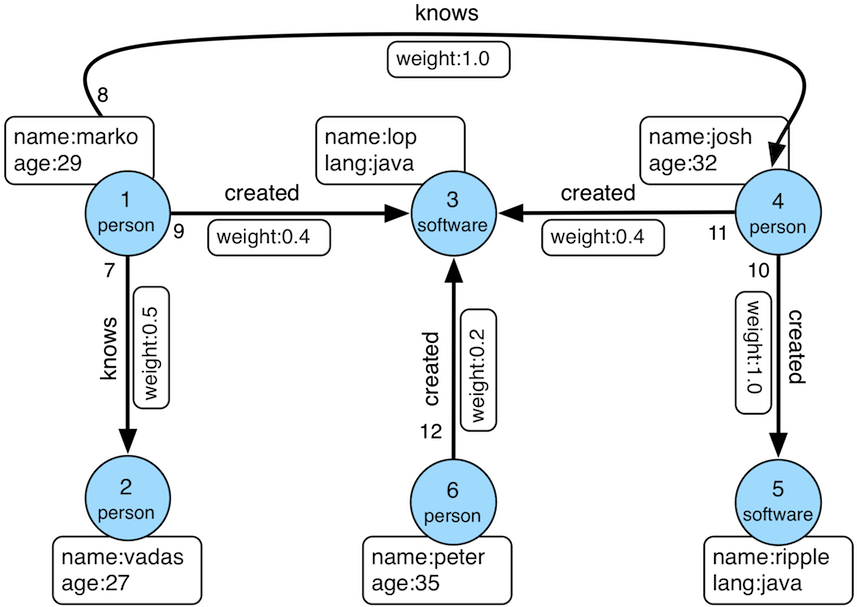
数据导入程序如下:
public class Loader {
    public static void main(String[] args) {
        HugeClient client = new HugeClient("http://127.0.0.1:8080", "hugegraph");
        SchemaManager schema = client.schema();
        schema.propertyKey("name").asText().ifNotExist().create();
        schema.propertyKey("age").asInt().ifNotExist().create();
        schema.propertyKey("city").asText().ifNotExist().create();
        schema.propertyKey("weight").asDouble().ifNotExist().create();
        schema.propertyKey("lang").asText().ifNotExist().create();
        schema.propertyKey("date").asText().ifNotExist().create();
        schema.propertyKey("price").asInt().ifNotExist().create();

        schema.vertexLabel("person")
              .properties("name", "age", "city")
              .primaryKeys("name")
              .nullableKeys("age")
              .ifNotExist()
              .create();

        schema.vertexLabel("software")
              .properties("name", "lang", "price")
              .primaryKeys("name")
              .nullableKeys("price")
              .ifNotExist()
              .create();

        schema.indexLabel("personByCity")
              .onV("person")
              .by("city")
              .secondary()
              .ifNotExist()
              .create();

        schema.indexLabel("personByAgeAndCity")
              .onV("person")
              .by("age", "city")
              .secondary()
              .ifNotExist()
              .create();

        schema.indexLabel("softwareByPrice")
              .onV("software")
              .by("price")
              .range()
              .ifNotExist()
              .create();

        schema.edgeLabel("knows")
              .multiTimes()
              .sourceLabel("person")
              .targetLabel("person")
              .properties("date", "weight")
              .sortKeys("date")
              .nullableKeys("weight")
              .ifNotExist()
              .create();

        schema.edgeLabel("created")
              .sourceLabel("person").targetLabel("software")
              .properties("date", "weight")
              .nullableKeys("weight")
              .ifNotExist()
              .create();

        schema.indexLabel("createdByDate")
              .onE("created")
              .by("date")
              .secondary()
              .ifNotExist()
              .create();

        schema.indexLabel("createdByWeight")
              .onE("created")
              .by("weight")
              .range()
              .ifNotExist()
              .create();

        schema.indexLabel("knowsByWeight")
              .onE("knows")
              .by("weight")
              .range()
              .ifNotExist()
              .create();

        GraphManager graph = client.graph();
        Vertex marko = graph.addVertex(T.label, "person", "name", "marko",
                                       "age", 29, "city", "Beijing");
        Vertex vadas = graph.addVertex(T.label, "person", "name", "vadas",
                                       "age", 27, "city", "Hongkong");
        Vertex lop = graph.addVertex(T.label, "software", "name", "lop",
                                     "lang", "java", "price", 328);
        Vertex josh = graph.addVertex(T.label, "person", "name", "josh",
                                      "age", 32, "city", "Beijing");
        Vertex ripple = graph.addVertex(T.label, "software", "name", "ripple",
                                        "lang", "java", "price", 199);
        Vertex peter = graph.addVertex(T.label, "person", "name", "peter",
                                       "age", 35, "city", "Shanghai");

        marko.addEdge("knows", vadas, "date", "20160110", "weight", 0.5);
        marko.addEdge("knows", josh, "date", "20130220", "weight", 1.0);
        marko.addEdge("created", lop, "date", "20171210", "weight", 0.4);
        josh.addEdge("created", lop, "date", "20091111", "weight", 0.4);
        josh.addEdge("created", ripple, "date", "20171210", "weight", 1.0);
        peter.addEdge("created", lop, "date", "20170324", "weight", 0.2);
    }
}
顶点 ID 为:
"2:ripple",
"1:vadas",
"1:peter",
"1:josh",
"1:marko",
"2:lop"
边 ID 为:
"S1:peter>2>>S2:lop",
"S1:josh>2>>S2:lop",
"S1:josh>2>>S2:ripple",
"S1:marko>1>20130220>S1:josh",
"S1:marko>1>20160110>S1:vadas",
"S1:marko>2>>S2:lop"
3.2.1 K-out API(GET,基础版)
3.2.1.1 功能介绍
根据起始顶点、方向、边的类型(可选)和深度 depth,查找从起始顶点出发恰好 depth 步可达的顶点
Params
- source:起始顶点 id,必填项
- direction:起始顶点向外发散的方向(OUT,IN,BOTH),选填项,默认是 BOTH
- max_depth:步数,必填项
- label:边的类型,选填项,默认代表所有 edge label
- nearest:nearest 为 true 时,代表起始顶点到达结果顶点的最短路径长度为 depth,不存在更短的路径;nearest 为 false 时,代表起始顶点到结果顶点有一条长度为 depth 的路径(未必最短且可以有环),选填项,默认为 true
- max_degree:查询过程中,单个顶点遍历的最大邻接边数目,选填项,默认为 10000
- capacity:遍历过程中最大的访问的顶点数目,选填项,默认为 10000000
- limit:返回的顶点的最大数目,选填项,默认为 10000000
3.2.1.2 使用方法
Method & Url
GET http://localhost:8080/graphspaces/DEFAULT/graphs/{graph}/traversers/kout?source="1:marko"&max_depth=2
Response Status
Response Body
{
    "vertices":[
        "2:ripple",
        "1:peter"
    ]
}
3.2.1.3 适用场景
查找恰好 N 步关系可达的顶点。两个例子:
- 家族关系中,查找一个人的所有孙子,person A 通过连续的两条“儿子”边到达的顶点集合。
- 社交关系中发现潜在好友,例如:与目标用户相隔两层朋友关系的用户,可以通过连续两条“朋友”边到达的顶点。
3.2.2 K-out API(POST,高级版)
3.2.2.1 功能介绍
根据起始顶点、步骤(包括方向、边类型和过滤属性)和深度 depth,查找从起始顶点出发恰好 depth 步可达的顶点。
与 K-out 基础版的不同在于:
- 支持只统计邻居数量
- 支持边属性过滤
- 支持返回到达邻居的最短路径
Params
- source:起始顶点 id,必填项
- steps: 从起始点出发的 Steps,必填项,结构如下:
- direction:表示边的方向(OUT,IN,BOTH),默认是 BOTH
- edge_steps:边 Step 集合,支持对单边的类型和属性过滤,如果为空,则不过滤
- vertex_steps:顶点 Step 集合,支持对单点的类型和属性过滤,如果为空,则不过滤
- label:顶点类型
- properties:顶点属性
- max_degree:查询过程中,单个顶点遍历的最大邻接边数目,默认为 10000 (注:0.12 版之前 step 内仅支持 degree 作为参数名,0.12 开始统一使用 max_degree, 并向下兼容 degree 写法)
- skip_degree:用于设置查询过程中舍弃超级顶点的最小边数,即当某个顶点的邻接边数目大于 skip_degree 时,完全舍弃该顶点。选填项,如果开启时,需满足
skip_degree >= max_degree 约束,默认为 0 (不启用),表示不跳过任何点 (注意:开启此配置后,遍历时会尝试访问一个顶点的 skip_degree 条边,而不仅仅是 max_degree 条边,这样有额外的遍历开销,对查询性能影响可能有较大影响,请确认理解后再开启)
- max_depth:步数,必填项
- nearest:nearest 为 true 时,代表起始顶点到达结果顶点的最短路径长度为 depth,不存在更短的路径;nearest 为 false 时,代表起始顶点到结果顶点有一条长度为 depth 的路径(未必最短且可以有环),选填项,默认为 true
- count_only:Boolean 值,true 表示只统计结果的数目,不返回具体结果;false 表示返回具体的结果,默认为 false
- with_path:true 表示返回起始点到每个邻居的最短路径,false 表示不返回起始点到每个邻居的最短路径,选填项,默认为 false
- with_edge,选填项,默认为 false:
- 如果设置为 true,则结果将包含所有边的完整信息,即路径中的所有边
- 当 with_path 为 true 时,将返回所有路径中的边的完整信息
- 当 with_path 为 false 时,不返回任何信息
- 如果设置为 false,则仅返回边的 id
- with_vertex,选填项,默认为 false:
- 如果设置为 true,则结果将包含所有顶点的完整信息,即路径中的所有顶点
- 当 with_path 为 true 时,将返回所有路径中的顶点的完整信息
- 当 with_path 为 false 时,返回所有邻居顶点的完整信息
- 如果设置为 false,则仅返回顶点的 id
- capacity:遍历过程中最大的访问的顶点数目,选填项,默认为 10000000
- limit:返回的顶点的最大数目,选填项,默认为 10000000
- traverse_mode: 遍历方式,可选择“breadth_first_search”或“depth_first_search”作为参数,默认为“breadth_first_search”
3.2.2.2 使用方法
Method & Url
POST http://localhost:8080/graphspaces/DEFAULT/graphs/{graph}/traversers/kout
Request Body
{
    "source": "1:marko",
    "steps": {
        "direction": "BOTH",
        "edge_steps": [
            {
                "label": "knows",
                "properties": {
                    "weight": "P.gt(0.1)"
                }
            },
            {
                "label": "created",
                "properties": {
                    "weight": "P.gt(0.1)"
                }
            }
        ],
        "vertex_steps": [
            {
                "label": "person",
                "properties": {
                    "age": "P.lt(32)"
                }
            },
            {
                "label": "software",
                "properties": {}
            }
        ],
        "max_degree": 10000,
        "skip_degree": 100000
    },
    "max_depth": 1,
    "nearest": true,
    "limit": 10000,
    "with_vertex": true,
    "with_path": true,
    "with_edge": true
}
Response Status
Response Body
{
    "size": 2,
	"kout": [
        "1:vadas",
        "2:lop"
    ],
    "paths": [
        {
            "objects": [
                "1:marko",
                "2:lop"
            ]
        },
        {
            "objects": [
                "1:marko",
                "1:vadas"
            ]
        }
    ],
    "vertices": [
        {
            "id": "1:marko",
            "label": "person",
            "type": "vertex",
            "properties": {
                "name": "marko",
                "age": 29,
                "city": "Beijing"
            }
        },
        {
            "id": "1:vadas",
            "label": "person",
            "type": "vertex",
            "properties": {
                "name": "vadas",
                "age": 27,
                "city": "Hongkong"
            }
        },
        {
            "id": "2:lop",
            "label": "software",
            "type": "vertex",
            "properties": {
                "name": "lop",
                "lang": "java",
                "price": 328
            }
        }
    ],
    "edges": [
        {
            "id": "S1:marko>1>20160110>S1:vadas",
            "label": "knows",
            "type": "edge",
            "outV": "1:marko",
            "outVLabel": "person",
            "inV": "1:vadas",
            "inVLabel": "person",
            "properties": {
                "weight": 0.5,
                "date": "20160110"
            }
        },
        {
            "id": "S1:marko>2>>S2:lop",
            "label": "created",
            "type": "edge",
            "outV": "1:marko",
            "outVLabel": "person",
            "inV": "2:lop",
            "inVLabel": "software",
            "properties": {
                "weight": 0.4,
                "date": "20171210"
            }
        }
    ]
}
3.2.2.3 适用场景
参见 3.2.1.3
3.2.3 K-neighbor(GET,基础版)
3.2.3.1 功能介绍
根据起始顶点、方向、边的类型(可选)和深度 depth,查找包括起始顶点在内、depth 步之内可达的所有顶点
相当于:起始顶点、K-out(1)、K-out(2)、… 、K-out(max_depth) 的并集
Params
- source: 起始顶点 id,必填项
- direction:起始顶点向外发散的方向(OUT,IN,BOTH),选填项,默认是 BOTH
- max_depth:步数,必填项
- label:边的类型,选填项,默认代表所有 edge label
- max_degree:查询过程中,单个顶点遍历的最大邻接边数目,选填项,默认为 10000
- limit:返回的顶点的最大数目,也即遍历过程中最大的访问的顶点数目,选填项,默认为 10000000
3.2.3.2 使用方法
Method & Url
GET http://localhost:8080/graphspaces/DEFAULT/graphs/{graph}/traversers/kneighbor?source=“1:marko”&max_depth=2
Response Status
Response Body
{
    "vertices":[
        "2:ripple",
        "1:marko",
        "1:josh",
        "1:vadas",
        "1:peter",
        "2:lop"
    ]
}
3.2.3.3 适用场景
查找 N 步以内可达的所有顶点,例如:
- 家族关系中,查找一个人五服以内所有子孙,person A 通过连续的 5 条“亲子”边到达的顶点集合。
- 社交关系中发现好友圈子,例如目标用户通过 1 条、2 条、3 条“朋友”边可到达的用户可以组成目标用户的朋友圈子
3.2.4 K-neighbor API(POST,高级版)
3.2.4.1 功能介绍
根据起始顶点、步骤(包括方向、边类型和过滤属性)和深度 depth,查找从起始顶点出发 depth 步内可达的所有顶点。
与 K-neighbor 基础版的不同在于:
- 支持只统计邻居数量
- 支持边属性过滤
- 支持返回到达邻居的最短路径
Params
- source:起始顶点 id,必填项
- steps: 从起始点出发的 Steps,必填项,结构如下:
- direction:表示边的方向(OUT,IN,BOTH),默认是 BOTH
- 从起始点出发的 Steps,必填项,结构如下:
- direction:表示边的方向(OUT,IN,BOTH),默认是 BOTH
- edge_steps:边 Step 集合,支持对单边的类型和属性过滤,如果为空,则不过滤
- vertex_steps:顶点 Step 集合,支持对单点的类型和属性过滤,如果为空,则不过滤
- label:顶点类型
- properties:顶点属性
- max_degree:查询过程中,单个顶点遍历的最大邻接边数目,默认为 10000 (注:0.12 版之前 step 内仅支持 degree 作为参数名,0.12 开始统一使用 max_degree, 并向下兼容 degree 写法)
- skip_degree:用于设置查询过程中舍弃超级顶点的最小边数,即当某个顶点的邻接边数目大于 skip_degree 时,完全舍弃该顶点。选填项,如果开启时,需满足
skip_degree >= max_degree 约束,默认为 0 (不启用),表示不跳过任何点 (注意:开启此配置后,遍历时会尝试访问一个顶点的 skip_degree 条边,而不仅仅是 max_degree 条边,这样有额外的遍历开销,对查询性能影响可能有较大影响,请确认理解后再开启)
- max_depth:步数,必填项
- count_only:Boolean 值,true 表示只统计结果的数目,不返回具体结果;false 表示返回具体的结果,默认为 false
- with_path:true 表示返回起始点到每个邻居的最短路径,false 表示不返回起始点到每个邻居的最短路径,选填项,默认为 false
- with_edge,选填项,默认为 false:
- 如果设置为 true,则结果将包含所有边的完整信息,即路径中的所有边
- 当 with_path 为 true 时,将返回所有路径中的边的完整信息
- 当 with_path 为 false 时,不返回任何信息
- 如果设置为 false,则仅返回边的 id
- with_vertex,选填项,默认为 false:
- 如果设置为 true,则结果将包含所有顶点的完整信息,即路径中的所有顶点
- 当 with_path 为 true 时,将返回所有路径中的顶点的完整信息
- 当 with_path 为 false 时,返回所有邻居顶点的完整信息
- 如果设置为 false,则仅返回顶点的 id
- limit:返回的顶点的最大数目,选填项,默认为 10000000
3.2.4.2 使用方法
Method & Url
POST http://localhost:8080/graphspaces/DEFAULT/graphs/{graph}/traversers/kneighbor
Request Body
{
  	"source": "1:marko",
  	"steps": {
  	  	"direction": "BOTH",
  	  	"edge_steps": [
  	  	    {
  	  	        "label": "knows",
  	  	        "properties": {}
  	  	    },
  	  	    {
  	  	        "label": "created",
  	  	        "properties": {}
  	  	    }
  	  	],
  	  	"vertex_steps": [
  	  	    {
  	  	        "label": "person",
  	  	        "properties": {
  	  	            "age": "P.gt(28)"
  	  	        }
  	  	    },
  	  	    {
  	  	        "label": "software",
  	  	        "properties": {}
  	  	    }
  	  	],
  	  	"max_degree": 10000,
  	  	"skip_degree": 100000
  	},
  	"max_depth": 3,
  	"limit": 10000,
  	"with_vertex": true,
  	"with_path": true,
  	"with_edge": true
}
Response Status
Response Body
{
    "size": 4,
	"kneighbor": [
        "1:josh",
        "2:lop",
        "1:peter",
        "2:ripple"
    ],
    "paths": [
        {
            "objects": [
                "1:marko",
                "2:lop"
            ]
        },
        {
            "objects": [
                "1:marko",
                "2:lop",
                "1:peter"
            ]
        },
        {
            "objects": [
                "1:marko",
                "1:josh"
            ]
        },
        {
            "objects": [
                "1:marko",
                "1:josh",
                "2:ripple"
            ]
        }
    ],
    "vertices": [
        {
            "id": "2:ripple",
            "label": "software",
            "type": "vertex",
            "properties": {
                "name": "ripple",
                "lang": "java",
                "price": 199
            }
        },
        {
            "id": "1:marko",
            "label": "person",
            "type": "vertex",
            "properties": {
                "name": "marko",
                "age": 29,
                "city": "Beijing"
            }
        },
        {
            "id": "1:josh",
            "label": "person",
            "type": "vertex",
            "properties": {
                "name": "josh",
                "age": 32,
                "city": "Beijing"
            }
        },
        {
            "id": "1:peter",
            "label": "person",
            "type": "vertex",
            "properties": {
                "name": "peter",
                "age": 35,
                "city": "Shanghai"
            }
        },
        {
            "id": "2:lop",
            "label": "software",
            "type": "vertex",
            "properties": {
                "name": "lop",
                "lang": "java",
                "price": 328
            }
        }
    ],
    "edges": [
        {
            "id": "S1:josh>2>>S2:ripple",
            "label": "created",
            "type": "edge",
            "outV": "1:josh",
            "outVLabel": "person",
            "inV": "2:ripple",
            "inVLabel": "software",
            "properties": {
                "weight": 1.0,
                "date": "20171210"
            }
        },
        {
            "id": "S1:marko>2>>S2:lop",
            "label": "created",
            "type": "edge",
            "outV": "1:marko",
            "outVLabel": "person",
            "inV": "2:lop",
            "inVLabel": "software",
            "properties": {
                "weight": 0.4,
                "date": "20171210"
            }
        },
        {
            "id": "S1:marko>1>20130220>S1:josh",
            "label": "knows",
            "type": "edge",
            "outV": "1:marko",
            "outVLabel": "person",
            "inV": "1:josh",
            "inVLabel": "person",
            "properties": {
                "weight": 1.0,
                "date": "20130220"
            }
        },
        {
            "id": "S1:peter>2>>S2:lop",
            "label": "created",
            "type": "edge",
            "outV": "1:peter",
            "outVLabel": "person",
            "inV": "2:lop",
            "inVLabel": "software",
            "properties": {
                "weight": 0.2,
                "date": "20170324"
            }
        }
    ]
}
3.2.4.3 适用场景
参见 3.2.3.3
3.2.5 Same Neighbors
3.2.5.1 功能介绍
查询两个点的共同邻居
Params
- vertex:一个顶点 id,必填项
- other:另一个顶点 id,必填项
- direction:顶点向外发散的方向(OUT,IN,BOTH),选填项,默认是 BOTH
- label:边的类型,选填项,默认代表所有 edge label
- max_degree:查询过程中,单个顶点遍历的最大邻接边数目,选填项,默认为 10000
- limit:返回的共同邻居的最大数目,选填项,默认为 10000000
3.2.5.2 使用方法
Method & Url
GET http://localhost:8080/graphspaces/DEFAULT/graphs/{graph}/traversers/sameneighbors?vertex=“1:marko”&other="1:josh"
Response Status
Response Body
{
    "same_neighbors":[
        "2:lop"
    ]
}
3.2.5.3 适用场景
查找两个顶点的共同邻居:
3.2.6 Jaccard Similarity (GET)
3.2.6.1 功能介绍
计算两个顶点的 jaccard similarity(两个顶点邻居的交集比上两个顶点邻居的并集)
Params
- vertex:一个顶点 id,必填项
- other:另一个顶点 id,必填项
- direction:顶点向外发散的方向(OUT,IN,BOTH),选填项,默认是 BOTH
- label:边的类型,选填项,默认代表所有 edge label
- max_degree:查询过程中,单个顶点遍历的最大邻接边数目,选填项,默认为 10000
3.2.6.2 使用方法
Method & Url
GET http://localhost:8080/graphspaces/DEFAULT/graphs/{graph}/traversers/jaccardsimilarity?vertex="1:marko"&other="1:josh"
Response Status
Response Body
{
    "jaccard_similarity": 0.2
}
3.2.6.3 适用场景
用于评估两个点的相似性或者紧密度
3.2.7 Jaccard Similarity (POST)
3.2.7.1 功能介绍
计算与指定顶点的 jaccard similarity 最大的 N 个点
jaccard similarity 的计算方式为:两个顶点邻居的交集比上两个顶点邻居的并集
Params
- vertex:一个顶点 id,必填项
- 从起始点出发的 Step,必填项,结构如下:
- direction:表示边的方向(OUT,IN,BOTH),默认是 BOTH
- labels:边的类型列表
- properties:通过属性的值过滤边
- max_degree:查询过程中,单个顶点遍历的最大邻接边数目,默认为 10000 (注:0.12 版之前 step 内仅支持 degree 作为参数名,0.12 开始统一使用 max_degree, 并向下兼容 degree 写法)
- skip_degree:用于设置查询过程中舍弃超级顶点的最小边数,即当某个顶点的邻接边数目大于 skip_degree 时,完全舍弃该顶点。选填项,如果开启时,需满足
skip_degree >= max_degree 约束,默认为 0 (不启用),表示不跳过任何点 (注意:开启此配置后,遍历时会尝试访问一个顶点的 skip_degree 条边,而不仅仅是 max_degree 条边,这样有额外的遍历开销,对查询性能影响可能有较大影响,请确认理解后再开启)
- top:返回一个起点的 jaccard similarity 中最大的 top 个,选填项,默认为 100
- capacity:遍历过程中最大的访问的顶点数目,选填项,默认为 10000000
3.2.7.2 使用方法
Method & Url
POST http://localhost:8080/graphspaces/DEFAULT/graphs/{graph}/traversers/jaccardsimilarity
Request Body
{
  "vertex": "1:marko",
  "step": {
    "direction": "BOTH",
    "labels": [],
    "max_degree": 10000,
    "skip_degree": 100000
  },
  "top": 3
}
Response Status
Response Body
{
    "2:ripple": 0.3333333333333333,
    "1:peter": 0.3333333333333333,
    "1:josh": 0.2
}
3.2.7.3 适用场景
用于在图中找出与指定顶点相似性最高的顶点
3.2.8 Shortest Path
3.2.8.1 功能介绍
根据起始顶点、目的顶点、方向、边的类型(可选)和最大深度,查找一条最短路径
Params
- source:起始顶点 id,必填项
- target:目的顶点 id,必填项
- direction:起始顶点向外发散的方向(OUT,IN,BOTH),选填项,默认是 BOTH
- max_depth:最大步数,必填项
- label:边的类型,选填项,默认代表所有 edge label
- max_degree:查询过程中,单个顶点遍历的最大邻接边数目,选填项,默认为 10000
- skip_degree:用于设置查询过程中舍弃超级顶点的最小边数,即当某个顶点的邻接边数目大于 skip_degree 时,完全舍弃该顶点。选填项,如果开启时,需满足
skip_degree >= max_degree 约束,默认为 0 (不启用),表示不跳过任何点 (注意:开启此配置后,遍历时会尝试访问一个顶点的 skip_degree 条边,而不仅仅是 max_degree 条边,这样有额外的遍历开销,对查询性能影响可能有较大影响,请确认理解后再开启) - capacity:遍历过程中最大的访问的顶点数目,选填项,默认为 10000000
3.2.8.2 使用方法
Method & Url
GET http://localhost:8080/graphspaces/DEFAULT/graphs/{graph}/traversers/shortestpath?source="1:marko"&target="2:ripple"&max_depth=3
Response Status
Response Body
{
    "path":[
        "1:marko",
        "1:josh",
        "2:ripple"
    ]
}
3.2.8.3 适用场景
查找两个顶点间的最短路径,例如:
- 社交关系网中,查找两个用户有关系的最短路径,即最近的朋友关系链
- 设备关联网络中,查找两个设备最短的关联关系
3.2.9 All Shortest Paths
3.2.9.1 功能介绍
根据起始顶点、目的顶点、方向、边的类型(可选)和最大深度,查找两点间所有的最短路径
Params
- source:起始顶点 id,必填项
- target:目的顶点 id,必填项
- direction:起始顶点向外发散的方向(OUT,IN,BOTH),选填项,默认是 BOTH
- max_depth:最大步数,必填项
- label:边的类型,选填项,默认代表所有 edge label
- max_degree:查询过程中,单个顶点遍历的最大邻接边数目,选填项,默认为 10000
- skip_degree:用于设置查询过程中舍弃超级顶点的最小边数,即当某个顶点的邻接边数目大于 skip_degree 时,完全舍弃该顶点。选填项,如果开启时,需满足
skip_degree >= max_degree 约束,默认为 0 (不启用),表示不跳过任何点 (注意:开启此配置后,遍历时会尝试访问一个顶点的 skip_degree 条边,而不仅仅是 max_degree 条边,这样有额外的遍历开销,对查询性能影响可能有较大影响,请确认理解后再开启) - capacity:遍历过程中最大的访问的顶点数目,选填项,默认为 10000000
3.2.9.2 使用方法
Method & Url
GET http://localhost:8080/graphspaces/DEFAULT/graphs/{graph}/traversers/allshortestpaths?source="A"&target="Z"&max_depth=10
Response Status
Response Body
{
    "paths":[
        {
            "objects": [
                "A",
                "B",
                "C",
                "Z"
            ]
        },
        {
            "objects": [
                "A",
                "M",
                "N",
                "Z"
            ]
        }
    ]
}
3.2.9.3 适用场景
查找两个顶点间的所有最短路径,例如:
- 社交关系网中,查找两个用户有关系的全部最短路径,即最近的朋友关系链
- 设备关联网络中,查找两个设备全部的最短关联关系
3.2.10 Weighted Shortest Path
3.2.10.1 功能介绍
根据起始顶点、目的顶点、方向、边的类型(可选)和最大深度,查找一条带权最短路径
Params
- source:起始顶点 id,必填项
- target:目的顶点 id,必填项
- direction:起始顶点向外发散的方向(OUT,IN,BOTH),选填项,默认是 BOTH
- label:边的类型,选填项,默认代表所有 edge label
- weight:边的权重属性,必填项,必须是数字类型的属性
- max_degree:查询过程中,单个顶点遍历的最大邻接边数目,选填项,默认为 10000
- skip_degree:用于设置查询过程中舍弃超级顶点的最小边数,即当某个顶点的邻接边数目大于 skip_degree 时,完全舍弃该顶点。选填项,如果开启时,需满足
skip_degree >= max_degree 约束,默认为 0 (不启用),表示不跳过任何点 (注意:开启此配置后,遍历时会尝试访问一个顶点的 skip_degree 条边,而不仅仅是 max_degree 条边,这样有额外的遍历开销,对查询性能影响可能有较大影响,请确认理解后再开启) - capacity:遍历过程中最大的访问的顶点数目,选填项,默认为 10000000
- with_vertex:true 表示返回结果包含完整的顶点信息(路径中的全部顶点),false 时表示只返回顶点 id,选填项,默认为 false
3.2.10.2 使用方法
Method & Url
GET http://localhost:8080/graphspaces/DEFAULT/graphs/{graph}/traversers/weightedshortestpath?source="1:marko"&target="2:ripple"&weight="weight"&with_vertex=true
Response Status
Response Body
{
    "path": {
        "weight": 2.0,
        "vertices": [
            "1:marko",
            "1:josh",
            "2:ripple"
        ]
    },
    "vertices": [
        {
            "id": "1:marko",
            "label": "person",
            "type": "vertex",
            "properties": {
                "name": "marko",
                "age": 29,
                "city": "Beijing"
            }
        },
        {
            "id": "1:josh",
            "label": "person",
            "type": "vertex",
            "properties": {
                "name": "josh",
                "age": 32,
                "city": "Beijing"
            }
        },
        {
            "id": "2:ripple",
            "label": "software",
            "type": "vertex",
            "properties": {
                "name": "ripple",
                "lang": "java",
                "price": 199
            }
        }
    ]
}
3.2.10.3 适用场景
查找两个顶点间的带权最短路径,例如:
- 交通线路中查找从 A 城市到 B 城市花钱最少的交通方式
3.2.11 Single Source Shortest Path
3.2.11.1 功能介绍
从一个顶点出发,查找该点到图中其他顶点的最短路径(可选是否带权重)
Params
- source:起始顶点 id,必填项
- direction:起始顶点向外发散的方向(OUT,IN,BOTH),选填项,默认是 BOTH
- label:边的类型,选填项,默认代表所有 edge label
- weight:边的权重属性,选填项,必须是数字类型的属性,如果不填或者虽然填了但是边没有该属性,则权重为 1.0
- max_degree:查询过程中,单个顶点遍历的最大邻接边数目,选填项,默认为 10000
- skip_degree:用于设置查询过程中舍弃超级顶点的最小边数,即当某个顶点的邻接边数目大于 skip_degree 时,完全舍弃该顶点。选填项,如果开启时,需满足
skip_degree >= max_degree 约束,默认为 0 (不启用),表示不跳过任何点 (注意:开启此配置后,遍历时会尝试访问一个顶点的 skip_degree 条边,而不仅仅是 max_degree 条边,这样有额外的遍历开销,对查询性能影响可能有较大影响,请确认理解后再开启) - capacity:遍历过程中最大的访问的顶点数目,选填项,默认为 10000000
- limit:查询到的目标顶点个数,也是返回的最短路径的条数,选填项,默认为 10
- with_vertex:true 表示返回结果包含完整的顶点信息(路径中的全部顶点),false 时表示只返回顶点 id,选填项,默认为 false
3.2.11.2 使用方法
Method & Url
GET http://localhost:8080/graphspaces/DEFAULT/graphs/{graph}/traversers/singlesourceshortestpath?source="1:marko"&with_vertex=true
Response Status
Response Body
{
    "paths": {
        "2:ripple": {
            "weight": 2.0,
            "vertices": [
                "1:marko",
                "1:josh",
                "2:ripple"
            ]
        },
        "1:josh": {
            "weight": 1.0,
            "vertices": [
                "1:marko",
                "1:josh"
            ]
        },
        "1:vadas": {
            "weight": 1.0,
            "vertices": [
                "1:marko",
                "1:vadas"
            ]
        },
        "1:peter": {
            "weight": 2.0,
            "vertices": [
                "1:marko",
                "2:lop",
                "1:peter"
            ]
        },
        "2:lop": {
            "weight": 1.0,
            "vertices": [
                "1:marko",
                "2:lop"
            ]
        }
    },
    "vertices": [
        {
            "id": "2:ripple",
            "label": "software",
            "type": "vertex",
            "properties": {
                "name": "ripple",
                "lang": "java",
                "price": 199
            }
        },
        {
            "id": "1:marko",
            "label": "person",
            "type": "vertex",
            "properties": {
                "name": "marko",
                "age": 29,
                "city": "Beijing"
            }
        },
        {
            "id": "1:josh",
            "label": "person",
            "type": "vertex",
            "properties": {
                "name": "josh",
                "age": 32,
                "city": "Beijing"
            }
        },
        {
            "id": "1:vadas",
            "label": "person",
            "type": "vertex",
            "properties": {
                "name": "vadas",
                "age": 27,
                "city": "Hongkong"
            }
        },
        {
            "id": "1:peter",
            "label": "person",
            "type": "vertex",
            "properties": {
                "name": "peter",
                "age": 35,
                "city": "Shanghai"
            }
        },
        {
            "id": "2:lop",
            "label": "software",
            "type": "vertex",
            "properties": {
                "name": "lop",
                "lang": "java",
                "price": 328
            }
        }
    ]
}
3.2.11.3 适用场景
查找从一个点出发到其他顶点的带权最短路径,比如:
- 查找从北京出发到全国其他所有城市的耗时最短的乘车方案
3.2.12 Multi Node Shortest Path
3.2.12.1 功能介绍
查找指定顶点集两两之间的最短路径
Params
- vertices:定义起始顶点,必填项,指定方式包括:
- ids:通过顶点 id 列表提供起始顶点
- label 和 properties:如果没有指定 ids,则使用 label 和 properties 的联合条件查询起始顶点
- label:顶点的类型
- properties:通过属性的值查询起始顶点
注意:properties 中的属性值可以是列表,表示只要 key 对应的 value 在列表中就可以
- step:表示从起始顶点到终止顶点走过的路径,必填项,Step 的结构如下:
- direction:表示边的方向(OUT,IN,BOTH),默认是 BOTH
- labels:边的类型列表
- properties:通过属性的值过滤边
- max_degree:查询过程中,单个顶点遍历的最大邻接边数目,默认为 10000 (注:0.12 版之前 step 内仅支持 degree 作为参数名,0.12 开始统一使用 max_degree, 并向下兼容 degree 写法)
- skip_degree:用于设置查询过程中舍弃超级顶点的最小边数,即当某个顶点的邻接边数目大于 skip_degree 时,完全舍弃该顶点。选填项,如果开启时,需满足
skip_degree >= max_degree 约束,默认为 0 (不启用),表示不跳过任何点 (注意:开启此配置后,遍历时会尝试访问一个顶点的 skip_degree 条边,而不仅仅是 max_degree 条边,这样有额外的遍历开销,对查询性能影响可能有较大影响,请确认理解后再开启)
- max_depth:步数,必填项
- capacity:遍历过程中最大的访问的顶点数目,选填项,默认为 10000000
- with_vertex:true 表示返回结果包含完整的顶点信息(路径中的全部顶点),false 时表示只返回顶点 id,选填项,默认为 false
3.2.12.2 使用方法
Method & Url
POST http://localhost:8080/graphspaces/DEFAULT/graphs/{graph}/traversers/multinodeshortestpath
Request Body
{
    "vertices": {
        "ids": ["382:marko", "382:josh", "382:vadas", "382:peter", "383:lop", "383:ripple"]
    },
    "step": {
        "direction": "BOTH",
        "properties": {
        }
    },
    "max_depth": 10,
    "capacity": 100000000,
    "with_vertex": true
}
Response Status
Response Body
{
    "paths": [
        {
            "objects": [
                "382:peter",
                "383:lop"
            ]
        },
        {
            "objects": [
                "382:peter",
                "383:lop",
                "382:marko"
            ]
        },
        {
            "objects": [
                "382:peter",
                "383:lop",
                "382:josh"
            ]
        },
        {
            "objects": [
                "382:peter",
                "383:lop",
                "382:marko",
                "382:vadas"
            ]
        },
        {
            "objects": [
                "383:lop",
                "382:marko"
            ]
        },
        {
            "objects": [
                "383:lop",
                "382:josh"
            ]
        },
        {
            "objects": [
                "383:lop",
                "382:marko",
                "382:vadas"
            ]
        },
        {
            "objects": [
                "382:peter",
                "383:lop",
                "382:josh",
                "383:ripple"
            ]
        },
        {
            "objects": [
                "382:marko",
                "382:josh"
            ]
        },
        {
            "objects": [
                "383:lop",
                "382:josh",
                "383:ripple"
            ]
        },
        {
            "objects": [
                "382:marko",
                "382:vadas"
            ]
        },
        {
            "objects": [
                "382:marko",
                "382:josh",
                "383:ripple"
            ]
        },
        {
            "objects": [
                "382:josh",
                "383:ripple"
            ]
        },
        {
            "objects": [
                "382:josh",
                "382:marko",
                "382:vadas"
            ]
        },
        {
            "objects": [
                "382:vadas",
                "382:marko",
                "382:josh",
                "383:ripple"
            ]
        }
    ],
    "vertices": [
        {
            "id": "382:peter",
            "label": "person",
            "type": "vertex",
            "properties": {
                "name": "peter",
                "age": 29,
                "city": "Shanghai"
            }
        },
        {
            "id": "383:lop",
            "label": "software",
            "type": "vertex",
            "properties": {
                "name": "lop",
                "lang": "java",
                "price": 328
            }
        },
        {
            "id": "382:marko",
            "label": "person",
            "type": "vertex",
            "properties": {
                "name": "marko",
                "age": 29,
                "city": "Beijing"
            }
        },
        {
            "id": "382:josh",
            "label": "person",
            "type": "vertex",
            "properties": {
                "name": "josh",
                "age": 32,
                "city": "Beijing"
            }
        },
        {
            "id": "382:vadas",
            "label": "person",
            "type": "vertex",
            "properties": {
                "name": "vadas",
                "age": 27,
                "city": "Hongkong"
            }
        },
        {
            "id": "383:ripple",
            "label": "software",
            "type": "vertex",
            "properties": {
                "name": "ripple",
                "lang": "java",
                "price": 199
            }
        }
    ]
}
3.2.12.3 适用场景
查找多个点之间的最短路径,比如:
3.2.13 Paths(GET,基础版)
3.2.13.1 功能介绍
根据起始顶点、目的顶点、方向、边的类型(可选)和最大深度等条件查找所有路径
Params
- source:起始顶点 id,必填项
- target:目的顶点 id,必填项
- direction:起始顶点向外发散的方向(OUT,IN,BOTH),选填项,默认是 BOTH
- label:边的类型,选填项,默认代表所有 edge label
- max_depth:步数,必填项
- max_degree:查询过程中,单个顶点遍历的最大邻接边数目,选填项,默认为 10000
- capacity:遍历过程中最大的访问的顶点数目,选填项,默认为 10000000
- limit:返回的路径的最大数目,选填项,默认为 10
3.2.13.2 使用方法
Method & Url
GET http://localhost:8080/graphspaces/DEFAULT/graphs/{graph}/traversers/paths?source="1:marko"&target="1:josh"&max_depth=5
Response Status
Response Body
{
    "paths":[
        {
            "objects":[
                "1:marko",
                "1:josh"
            ]
        },
        {
            "objects":[
                "1:marko",
                "2:lop",
                "1:josh"
            ]
        }
    ]
}
3.2.13.3 适用场景
查找两个顶点间的所有路径,例如:
- 社交网络中,查找两个用户所有可能的关系路径
- 设备关联网络中,查找两个设备之间所有的关联路径
3.2.14 Paths(POST,高级版)
3.2.14.1 功能介绍
根据起始顶点、目的顶点、步骤(step)和最大深度等条件查找所有路径
Params
- sources:定义起始顶点,必填项,指定方式包括:
- ids:通过顶点 id 列表提供起始顶点
- label 和 properties:如果没有指定 ids,则使用 label 和 properties 的联合条件查询起始顶点
- label:顶点的类型
- properties:通过属性的值查询起始顶点
注意:properties 中的属性值可以是列表,表示只要 key 对应的 value 在列表中就可以
- targets:定义终止顶点,必填项,指定方式包括:
- ids:通过顶点 id 列表提供终止顶点
- label 和 properties:如果没有指定 ids,则使用 label 和 properties 的联合条件查询终止顶点
- label:顶点的类型
- properties:通过属性的值查询终止顶点
注意:properties 中的属性值可以是列表,表示只要 key 对应的 value 在列表中就可以
- step:表示从起始顶点到终止顶点走过的路径,必填项,Step 的结构如下:
- direction:表示边的方向(OUT,IN,BOTH),默认是 BOTH
- labels:边的类型列表
- properties:通过属性的值过滤边
- max_degree:查询过程中,单个顶点遍历的最大邻接边数目,默认为 10000 (注:0.12 版之前 step 内仅支持 degree 作为参数名,0.12 开始统一使用 max_degree, 并向下兼容 degree 写法)
- skip_degree:用于设置查询过程中舍弃超级顶点的最小边数,即当某个顶点的邻接边数目大于 skip_degree 时,完全舍弃该顶点。选填项,如果开启时,需满足
skip_degree >= max_degree 约束,默认为 0 (不启用),表示不跳过任何点 (注意:开启此配置后,遍历时会尝试访问一个顶点的 skip_degree 条边,而不仅仅是 max_degree 条边,这样有额外的遍历开销,对查询性能影响可能有较大影响,请确认理解后再开启)
- max_depth:步数,必填项
- nearest:nearest 为 true 时,代表起始顶点到达结果顶点的最短路径长度为 depth,不存在更短的路径;nearest 为 false 时,代表起始顶点到结果顶点有一条长度为 depth 的路径(未必最短且可以有环),选填项,默认为 true
- capacity:遍历过程中最大的访问的顶点数目,选填项,默认为 10000000
- limit:返回的路径的最大数目,选填项,默认为 10
- with_vertex:true 表示返回结果包含完整的顶点信息(路径中的全部顶点),false 时表示只返回顶点 id,选填项,默认为 false
3.2.14.2 使用方法
Method & Url
POST http://localhost:8080/graphspaces/DEFAULT/graphs/{graph}/traversers/paths
Request Body
{
"sources": {
  "ids": ["1:marko"]
},
"targets": {
  "ids": ["1:peter"]
},
"step": {
"direction": "BOTH",
  "properties": {
    "weight": "P.gt(0.01)"
  }
},
"max_depth": 10,
"capacity": 100000000,
"limit": 10000000,
"with_vertex": false
}
Response Status
Response Body
{
    "paths": [
        {
            "objects": [
                "1:marko",
                "1:josh",
                "2:lop",
                "1:peter"
            ]
        },
        {
            "objects": [
                "1:marko",
                "2:lop",
                "1:peter"
            ]
        }
    ]
}
3.2.14.3 适用场景
查找两个顶点间的所有路径,例如:
- 社交网络中,查找两个用户所有可能的关系路径
- 设备关联网络中,查找两个设备之间所有的关联路径
3.2.15 Customized Paths
3.2.15.1 功能介绍
根据一批起始顶点、边规则(包括方向、边的类型和属性过滤)和最大深度等条件查找符合条件的所有的路径
Params
- sources:定义起始顶点,必填项,指定方式包括:
- ids:通过顶点 id 列表提供起始顶点
- label 和 properties:如果没有指定 ids,则使用 label 和 properties 的联合条件查询起始顶点
- label:顶点的类型
- properties:通过属性的值查询起始顶点
注意:properties 中的属性值可以是列表,表示只要 key 对应的 value 在列表中就可以
- steps:表示从起始顶点走过的路径规则,是一组 Step 的列表。必填项。每个 Step 的结构如下:
- direction:表示边的方向(OUT,IN,BOTH),默认是 BOTH
- labels:边的类型列表
- properties:通过属性的值过滤边
- weight_by:根据指定的属性计算边的权重,sort_by 不为 NONE 时有效,与 default_weight 互斥
- default_weight:当边没有属性作为权重计算值时,采取的默认权重,sort_by 不为 NONE 时有效,与 weight_by 互斥
- max_degree:查询过程中,单个顶点遍历的最大邻接边数目,默认为 10000 (注:0.12 版之前 step 内仅支持 degree 作为参数名,0.12 开始统一使用 max_degree, 并向下兼容 degree 写法)
- sample:当需要对某个 step 的符合条件的边进行采样时设置,-1 表示不采样,默认为采样 100
- sort_by:根据路径的权重排序,选填项,默认为 NONE:
- NONE 表示不排序,默认值
- INCR 表示按照路径权重的升序排序
- DECR 表示按照路径权重的降序排序
- capacity:遍历过程中最大的访问的顶点数目,选填项,默认为 10000000
- limit:返回的路径的最大数目,选填项,默认为 10
- with_vertex:true 表示返回结果包含完整的顶点信息(路径中的全部顶点),false 时表示只返回顶点 id,选填项,默认为 false
3.2.15.2 使用方法
Method & Url
POST http://localhost:8080/graphspaces/DEFAULT/graphs/{graph}/traversers/customizedpaths
Request Body
{
    "sources":{
        "ids":[

        ],
        "label":"person",
        "properties":{
            "name":"marko"
        }
    },
    "steps":[
        {
            "direction":"OUT",
            "labels":[
                "knows"
            ],
            "weight_by":"weight",
            "max_degree":-1
        },
        {
            "direction":"OUT",
            "labels":[
                "created"
            ],
            "default_weight":8,
            "max_degree":-1,
            "sample":1
        }
    ],
    "sort_by":"INCR",
    "with_vertex":true,
    "capacity":-1,
    "limit":-1
}
Response Status
Response Body
{
    "paths":[
        {
            "objects":[
                "1:marko",
                "1:josh",
                "2:lop"
            ],
            "weights":[
                1,
                8
            ]
        }
    ],
    "vertices":[
        {
            "id":"1:marko",
            "label":"person",
            "type":"vertex",
            "properties":{
                "city":[
                    {
                        "id":"1:marko>city",
                        "value":"Beijing"
                    }
                ],
                "name":[
                    {
                        "id":"1:marko>name",
                        "value":"marko"
                    }
                ],
                "age":[
                    {
                        "id":"1:marko>age",
                        "value":29
                    }
                ]
            }
        },
        {
            "id":"1:josh",
            "label":"person",
            "type":"vertex",
            "properties":{
                "city":[
                    {
                        "id":"1:josh>city",
                        "value":"Beijing"
                    }
                ],
                "name":[
                    {
                        "id":"1:josh>name",
                        "value":"josh"
                    }
                ],
                "age":[
                    {
                        "id":"1:josh>age",
                        "value":32
                    }
                ]
            }
        },
        {
            "id":"2:lop",
            "label":"software",
            "type":"vertex",
            "properties":{
                "price":[
                    {
                        "id":"2:lop>price",
                        "value":328
                    }
                ],
                "name":[
                    {
                        "id":"2:lop>name",
                        "value":"lop"
                    }
                ],
                "lang":[
                    {
                        "id":"2:lop>lang",
                        "value":"java"
                    }
                ]
            }
        }
    ]
}
3.2.15.3 适用场景
适合查找各种复杂的路径集合,例如:
- 社交网络中,查找看过张艺谋所导演的电影的用户关注的大 V 的路径(张艺谋—>电影—->用户—>大 V)
- 风控网络中,查找多个高风险用户的直系亲属的朋友的路径(高风险用户—>直系亲属—>朋友)
3.2.16 Template Paths
3.2.16.1 功能介绍
根据一批起始顶点、边规则(包括方向、边的类型和属性过滤)和最大深度等条件查找符合条件的所有的路径
Params
- sources:定义起始顶点,必填项,指定方式包括:
- ids:通过顶点 id 列表提供起始顶点
- label 和 properties:如果没有指定 ids,则使用 label 和 properties 的联合条件查询起始顶点
- label:顶点的类型
- properties:通过属性的值查询起始顶点
注意:properties 中的属性值可以是列表,表示只要 key 对应的 value 在列表中就可以
- targets:定义终止顶点,必填项,指定方式包括:
- ids:通过顶点 id 列表提供终止顶点
- label 和 properties:如果没有指定 ids,则使用 label 和 properties 的联合条件查询终止顶点
- label:顶点的类型
- properties:通过属性的值查询终止顶点
注意:properties 中的属性值可以是列表,表示只要 key 对应的 value 在列表中就可以
- steps:表示从起始顶点走过的路径规则,是一组 Step 的列表。必填项。每个 Step 的结构如下:
- direction:表示边的方向(OUT,IN,BOTH),默认是 BOTH
- labels:边的类型列表
- properties:通过属性的值过滤边
- max_times:当前 step 可以重复的次数,当为 N 时,表示从起始顶点可以经过当前 step 1-N 次
- max_degree:查询过程中,单个顶点遍历的最大邻接边数目,默认为 10000 (注:0.12 版之前 step 内仅支持 degree 作为参数名,0.12 开始统一使用 max_degree, 并向下兼容 degree 写法)
- skip_degree:用于设置查询过程中舍弃超级顶点的最小边数,即当某个顶点的邻接边数目大于 skip_degree 时,完全舍弃该顶点。选填项,如果开启时,需满足
skip_degree >= max_degree 约束,默认为 0 (不启用),表示不跳过任何点 (注意:开启此配置后,遍历时会尝试访问一个顶点的 skip_degree 条边,而不仅仅是 max_degree 条边,这样有额外的遍历开销,对查询性能影响可能有较大影响,请确认理解后再开启)
- with_ring:Boolean 值,true 表示包含环路;false 表示不包含环路,默认为 false
- capacity:遍历过程中最大的访问的顶点数目,选填项,默认为 10000000
- limit:返回的路径的最大数目,选填项,默认为 10
- with_vertex:true 表示返回结果包含完整的顶点信息(路径中的全部顶点),false 时表示只返回顶点 id,选填项,默认为 false
3.2.16.2 使用方法
Method & Url
POST http://localhost:8080/graphspaces/DEFAULT/graphs/{graph}/traversers/templatepaths
Request Body
{
  "sources": {
    "ids": [],
    "label": "person",
    "properties": {
      "name": "vadas"
    }
  },
  "targets": {
    "ids": [],
    "label": "software",
    "properties": {
      "name": "ripple"
    }
  },
  "steps": [
    {
      "direction": "IN",
      "labels": ["knows"],
      "properties": {
      },
      "max_degree": 10000,
      "skip_degree": 100000
    },
    {
      "direction": "OUT",
      "labels": ["created"],
      "properties": {
      },
      "max_degree": 10000,
      "skip_degree": 100000
    },
    {
      "direction": "IN",
      "labels": ["created"],
      "properties": {
      },
      "max_degree": 10000,
      "skip_degree": 100000
    },
    {
      "direction": "OUT",
      "labels": ["created"],
      "properties": {
      },
      "max_degree": 10000,
      "skip_degree": 100000
    }
  ],
  "capacity": 10000,
  "limit": 10,
  "with_vertex": true
}
Response Status
Response Body
{
    "paths": [
        {
            "objects": [
                "1:vadas",
                "1:marko",
                "2:lop",
                "1:josh",
                "2:ripple"
            ]
        }
    ],
    "vertices": [
        {
            "id": "2:ripple",
            "label": "software",
            "type": "vertex",
            "properties": {
                "name": "ripple",
                "lang": "java",
                "price": 199
            }
        },
        {
            "id": "1:marko",
            "label": "person",
            "type": "vertex",
            "properties": {
                "name": "marko",
                "age": 29,
                "city": "Beijing"
            }
        },
        {
            "id": "1:josh",
            "label": "person",
            "type": "vertex",
            "properties": {
                "name": "josh",
                "age": 32,
                "city": "Beijing"
            }
        },
        {
            "id": "1:vadas",
            "label": "person",
            "type": "vertex",
            "properties": {
                "name": "vadas",
                "age": 27,
                "city": "Hongkong"
            }
        },
        {
            "id": "2:lop",
            "label": "software",
            "type": "vertex",
            "properties": {
                "name": "lop",
                "lang": "java",
                "price": 328
            }
        }
    ]
}
3.2.16.3 适用场景
适合查找各种复杂的模板路径,比如 personA -(朋友)-> personB -(同学)-> personC,其中"朋友"和"同学"边可以分别是最多 3 层和 4 层的情况
3.2.17 Crosspoints
3.2.17.1 功能介绍
根据起始顶点、目的顶点、方向、边的类型(可选)和最大深度等条件查找相交点
Params
- source:起始顶点 id,必填项
- target:目的顶点 id,必填项
- direction:起始顶点到目的顶点的方向,目的点到起始点是反方向,BOTH 时不考虑方向(OUT,IN,BOTH),选填项,默认是 BOTH
- label:边的类型,选填项,默认代表所有 edge label
- max_depth:步数,必填项
- max_degree:查询过程中,单个顶点遍历的最大邻接边数目,选填项,默认为 10000
- capacity:遍历过程中最大的访问的顶点数目,选填项,默认为 10000000
- limit:返回的交点的最大数目,选填项,默认为 10
3.2.17.2 使用方法
Method & Url
GET http://localhost:8080/graphspaces/DEFAULT/graphs/{graph}/traversers/crosspoints?source="2:lop"&target="2:ripple"&max_depth=5&direction=IN
Response Status
Response Body
{
    "crosspoints":[
        {
            "crosspoint":"1:josh",
            "objects":[
                "2:lop",
                "1:josh",
                "2:ripple"
            ]
        }
    ]
}
3.2.17.3 适用场景
查找两个顶点的交点及其路径,例如:
- 社交网络中,查找两个用户共同关注的话题或者大 V
- 家族关系中,查找共同的祖先
3.2.18 Customized Crosspoints
3.2.18.1 功能介绍
根据一批起始顶点、多种边规则(包括方向、边的类型和属性过滤)和最大深度等条件查找符合条件的所有的路径终点的交集
Params
sources:定义起始顶点,必填项,指定方式包括:
- ids:通过顶点 id 列表提供起始顶点
- label 和 properties:如果没有指定 ids,则使用 label 和 properties 的联合条件查询起始顶点
- label:顶点的类型
- properties:通过属性的值查询起始顶点
注意:properties 中的属性值可以是列表,表示只要 key 对应的 value 在列表中就可以
path_patterns:表示从起始顶点走过的路径规则,是一组规则的列表。必填项。每个规则是一个 PathPattern
- 每个 PathPattern 是一组 Step 列表,每个 Step 结构如下:
- direction:表示边的方向(OUT,IN,BOTH),默认是 BOTH
- labels:边的类型列表
- properties:通过属性的值过滤边
- max_degree:查询过程中,单个顶点遍历的最大邻接边数目,默认为 10000 (注:0.12 版之前 step 内仅支持 degree 作为参数名,0.12 开始统一使用 max_degree, 并向下兼容 degree 写法)
- skip_degree:用于设置查询过程中舍弃超级顶点的最小边数,即当某个顶点的邻接边数目大于 skip_degree 时,完全舍弃该顶点。选填项,如果开启时,需满足
skip_degree >= max_degree 约束,默认为 0 (不启用),表示不跳过任何点 (注意:开启此配置后,遍历时会尝试访问一个顶点的 skip_degree 条边,而不仅仅是 max_degree 条边,这样有额外的遍历开销,对查询性能影响可能有较大影响,请确认理解后再开启)
capacity:遍历过程中最大的访问的顶点数目,选填项,默认为 10000000
limit:返回的路径的最大数目,选填项,默认为 10
with_path:true 表示返回交点所在的路径,false 表示不返回交点所在的路径,选填项,默认为 false
with_vertex,选填项,默认为 false:
- true 表示返回结果包含完整的顶点信息(路径中的全部顶点)
- with_path 为 true 时,返回所有路径中的顶点的完整信息
- with_path 为 false 时,返回所有交点的完整信息
- false 时表示只返回顶点 id
3.2.18.2 使用方法
Method & Url
POST http://localhost:8080/graphspaces/DEFAULT/graphs/{graph}/traversers/customizedcrosspoints
Request Body
{
    "sources":{
        "ids":[
            "2:lop",
            "2:ripple"
        ]
    },
    "path_patterns":[
        {
            "steps":[
                {
                    "direction":"IN",
                    "labels":[
                        "created"
                    ],
                    "max_degree":-1
                }
            ]
        }
    ],
    "with_path":true,
    "with_vertex":true,
    "capacity":-1,
    "limit":-1
}
Response Status
Response Body
{
    "crosspoints":[
        "1:josh"
    ],
    "paths":[
        {
            "objects":[
                "2:ripple",
                "1:josh"
            ]
        },
        {
            "objects":[
                "2:lop",
                "1:josh"
            ]
        }
    ],
    "vertices":[
        {
            "id":"2:ripple",
            "label":"software",
            "type":"vertex",
            "properties":{
                "price":[
                    {
                        "id":"2:ripple>price",
                        "value":199
                    }
                ],
                "name":[
                    {
                        "id":"2:ripple>name",
                        "value":"ripple"
                    }
                ],
                "lang":[
                    {
                        "id":"2:ripple>lang",
                        "value":"java"
                    }
                ]
            }
        },
        {
            "id":"1:josh",
            "label":"person",
            "type":"vertex",
            "properties":{
                "city":[
                    {
                        "id":"1:josh>city",
                        "value":"Beijing"
                    }
                ],
                "name":[
                    {
                        "id":"1:josh>name",
                        "value":"josh"
                    }
                ],
                "age":[
                    {
                        "id":"1:josh>age",
                        "value":32
                    }
                ]
            }
        },
        {
            "id":"2:lop",
            "label":"software",
            "type":"vertex",
            "properties":{
                "price":[
                    {
                        "id":"2:lop>price",
                        "value":328
                    }
                ],
                "name":[
                    {
                        "id":"2:lop>name",
                        "value":"lop"
                    }
                ],
                "lang":[
                    {
                        "id":"2:lop>lang",
                        "value":"java"
                    }
                ]
            }
        }
    ]
}
3.2.18.3 适用场景
查询一组顶点通过多种路径在终点有交集的情况。例如:
- 在商品图谱中,多款手机、学习机、游戏机通过不同的低级别的类目路径,最终都属于一级类目的电子设备
3.2.19 Rings
3.2.19.1 功能介绍
根据起始顶点、方向、边的类型(可选)和最大深度等条件查找可达的环路
例如:1 -> 25 -> 775 -> 14690 -> 25, 其中环路为 25 -> 775 -> 14690 -> 25
Params
- source:起始顶点 id,必填项
- direction:起始顶点发出的边的方向(OUT,IN,BOTH),选填项,默认是 BOTH
- label:边的类型,选填项,默认代表所有 edge label
- max_depth:步数,必填项
- source_in_ring:环路是否包含起点,选填项,默认为 true
- max_degree:查询过程中,单个顶点遍历的最大邻接边数目,选填项,默认为 10000
- capacity:遍历过程中最大的访问的顶点数目,选填项,默认为 10000000
- limit:返回的可达环路的最大数目,选填项,默认为 10
3.2.19.2 使用方法
Method & Url
GET http://localhost:8080/graphspaces/DEFAULT/graphs/{graph}/traversers/rings?source="1:marko"&max_depth=2
Response Status
Response Body
{
    "rings":[
        {
            "objects":[
                "1:marko",
                "1:josh",
                "1:marko"
            ]
        },
        {
            "objects":[
                "1:marko",
                "1:vadas",
                "1:marko"
            ]
        },
        {
            "objects":[
                "1:marko",
                "2:lop",
                "1:marko"
            ]
        }
    ]
}
3.2.19.3 适用场景
查询起始顶点可达的环路,例如:
- 风控项目中,查询一个用户可达的循环担保的人或者设备
- 设备关联网络中,发现一个设备周围的循环引用的设备
3.2.20 Rays
3.2.20.1 功能介绍
根据起始顶点、方向、边的类型(可选)和最大深度等条件查找发散到边界顶点的路径
例如:1 -> 25 -> 775 -> 14690 -> 2289 -> 18379, 其中 18379 为边界顶点,即没有从 18379 发出的边
Params
- source:起始顶点 id,必填项
- direction:起始顶点发出的边的方向(OUT,IN,BOTH),选填项,默认是 BOTH
- label:边的类型,选填项,默认代表所有 edge label
- max_depth:步数,必填项
- max_degree:查询过程中,单个顶点遍历的最大邻接边数目,选填项,默认为 10000
- capacity:遍历过程中最大的访问的顶点数目,选填项,默认为 10000000
- limit:返回的非环路的最大数目,选填项,默认为 10
3.2.20.2 使用方法
Method & Url
GET http://localhost:8080/graphspaces/DEFAULT/graphs/{graph}/traversers/rays?source="1:marko"&max_depth=2&direction=OUT
Response Status
Response Body
{
    "rays":[
        {
            "objects":[
                "1:marko",
                "1:vadas"
            ]
        },
        {
            "objects":[
                "1:marko",
                "2:lop"
            ]
        },
        {
            "objects":[
                "1:marko",
                "1:josh",
                "2:ripple"
            ]
        },
        {
            "objects":[
                "1:marko",
                "1:josh",
                "2:lop"
            ]
        }
    ]
}
3.2.20.3 适用场景
查找起始顶点到某种关系的边界顶点的路径,例如:
- 家族关系中,查找一个人到所有还没有孩子的子孙的路径
- 设备关联网络中,找到某个设备到终端设备的路径
3.2.21.1 功能介绍
按照条件查询一批顶点对应的"梭形相似点"。当两个顶点跟很多共同的顶点之间有某种关系的时候,我们认为这两个点为"梭形相似点"。举个例子说明"梭形相似点":“读者 A"读了 100 本书,可以定义读过这 100 本书中的 80 本以上的读者,是"读者 A"的"梭形相似点”
Params
sources:定义起始顶点,必填项,指定方式包括:
- ids:通过顶点 id 列表提供起始顶点
- label 和 properties:如果没有指定 ids,则使用 label 和 properties 的联合条件查询起始顶点
- label:顶点的类型
- properties:通过属性的值查询起始顶点
注意:properties 中的属性值可以是列表,表示只要 key 对应的 value 在列表中就可以
label:边的类型,选填项,默认代表所有 edge label
direction:起始顶点向外发散的方向(OUT,IN,BOTH),选填项,默认是 BOTH
min_neighbors:最少邻居数目,邻居数目少于这个阈值时,认为起点不具备"梭形相似点"。比如想要找一个"读者 A"读过的书的"梭形相似点",那么min_neighbors为 100 时,表示"读者 A"至少要读过 100 本书才可以有"梭形相似点",必填项
alpha:相似度,代表:起点与"梭形相似点"的共同邻居数目占起点的全部邻居数目的比例,必填项
min_similars:“梭形相似点"的最少个数,只有当起点的"梭形相似点"数目大于或等于该值时,才会返回起点及其"梭形相似点”,选填项,默认值为 1
top:返回一个起点的"梭形相似点"中相似度最高的 top 个,必填项,0 表示全部
group_property:与min_groups一起使用,当起点跟其所有的"梭形相似点"某个属性的值有至少min_groups个不同值时,才会返回该起点及其"梭形相似点"。比如为"读者 A"推荐"异地"书友时,需要设置group_property为读者的"城市"属性,min_group至少为 2,选填项,不填代表不需要根据属性过滤
min_groups:与group_property一起使用,只有group_property设置时才有意义
max_degree:查询过程中,单个顶点遍历的最大邻接边数目,选填项,默认为 10000
capacity:遍历过程中最大的访问的顶点数目,选填项,默认为 10000000
limit:返回的结果数目上限(一个起点及其"梭形相似点"算一个结果),选填项,默认为 10
with_intermediary:是否返回起点及其"梭形相似点"共同关联的中间点,默认为 false
with_vertex,选填项,默认为 false:
- true 表示返回结果包含完整的顶点信息
- false 时表示只返回顶点 id
3.2.21.2 使用方法
Method & Url
POST http://localhost:8080/graphspaces/DEFAULT/graphs/hugegraph/traversers/fusiformsimilarity
Request Body
{
    "sources":{
        "ids":[],
        "label": "person",
        "properties": {
            "name":"p1"
        }
    },
    "label":"read",
    "direction":"OUT",
    "min_neighbors":8,
    "alpha":0.75,
    "min_similars":1,
    "top":0,
    "group_property":"city",
    "min_group":2,
    "max_degree": 10000,
    "capacity": -1,
    "limit": -1,
    "with_intermediary": false,
    "with_vertex":true
}
Response Status
Response Body
{
    "similars": {
        "3:p1": [
            {
                "id": "3:p2",
                "score": 0.8888888888888888,
                "intermediaries": [
                ]
            },
            {
                "id": "3:p3",
                "score": 0.7777777777777778,
                "intermediaries": [
                ]
            }
        ]
    },
    "vertices": [
        {
            "id": "3:p1",
            "label": "person",
            "type": "vertex",
            "properties": {
                "name": "p1",
                "city": "Beijing"
            }
        },
        {
            "id": "3:p2",
            "label": "person",
            "type": "vertex",
            "properties": {
                "name": "p2",
                "city": "Shanghai"
            }
        },
        {
            "id": "3:p3",
            "label": "person",
            "type": "vertex",
            "properties": {
                "name": "p3",
                "city": "Beijing"
            }
        }
    ]
}
3.2.21.3 适用场景
查询一组顶点相似度很高的顶点。例如:
- 跟一个读者有类似书单的读者
- 跟一个玩家玩类似游戏的玩家
3.2.22 Vertices
3.2.22.1 根据顶点的 id 列表,批量查询顶点
Params
Method & Url
GET http://localhost:8080/graphspaces/DEFAULT/graphs/hugegraph/traversers/vertices?ids="1:marko"&ids="2:lop"
Response Status
Response Body
{
    "vertices":[
        {
            "id":"1:marko",
            "label":"person",
            "type":"vertex",
            "properties":{
                "city":[
                    {
                        "id":"1:marko>city",
                        "value":"Beijing"
                    }
                ],
                "name":[
                    {
                        "id":"1:marko>name",
                        "value":"marko"
                    }
                ],
                "age":[
                    {
                        "id":"1:marko>age",
                        "value":29
                    }
                ]
            }
        },
        {
            "id":"2:lop",
            "label":"software",
            "type":"vertex",
            "properties":{
                "price":[
                    {
                        "id":"2:lop>price",
                        "value":328
                    }
                ],
                "name":[
                    {
                        "id":"2:lop>name",
                        "value":"lop"
                    }
                ],
                "lang":[
                    {
                        "id":"2:lop>lang",
                        "value":"java"
                    }
                ]
            }
        }
    ]
}
3.2.22.2 获取顶点 Shard 信息
通过指定的分片大小 split_size,获取顶点分片信息(可以与 3.2.21.3 中的 Scan 配合使用来获取顶点)。
Params
Method & Url
GET http://localhost:8080/graphspaces/DEFAULT/graphs/hugegraph/traversers/vertices/shards?split_size=67108864
Response Status
Response Body
{
    "shards":[
        {
            "start": "0",
            "end": "2165893",
            "length": 0
        },
        {
            "start": "2165893",
            "end": "4331786",
            "length": 0
        },
        {
            "start": "4331786",
            "end": "6497679",
            "length": 0
        },
        {
            "start": "6497679",
            "end": "8663572",
            "length": 0
        },
        ......
    ]
}
3.2.22.3 根据 Shard 信息批量获取顶点
通过指定的分片信息批量查询顶点(Shard 信息的获取参见 3.2.21.2 Shard)。
Params
- start:分片起始位置,必填项
- end:分片结束位置,必填项
- page:分页位置,选填项,默认为 null,不分页;当 page 为“”时表示分页的第一页,从 start 指示的位置开始
- page_limit:分页获取顶点时,一页中顶点数目的上限,选填项,默认为 100000
Method & Url
GET http://localhost:8080/graphspaces/DEFAULT/graphs/hugegraph/traversers/vertices/scan?start=0&end=4294967295
Response Status
Response Body
{
    "vertices":[
        {
            "id":"2:ripple",
            "label":"software",
            "type":"vertex",
            "properties":{
                "price":[
                    {
                        "id":"2:ripple>price",
                        "value":199
                    }
                ],
                "name":[
                    {
                        "id":"2:ripple>name",
                        "value":"ripple"
                    }
                ],
                "lang":[
                    {
                        "id":"2:ripple>lang",
                        "value":"java"
                    }
                ]
            }
        },
        {
            "id":"1:vadas",
            "label":"person",
            "type":"vertex",
            "properties":{
                "city":[
                    {
                        "id":"1:vadas>city",
                        "value":"Hongkong"
                    }
                ],
                "name":[
                    {
                        "id":"1:vadas>name",
                        "value":"vadas"
                    }
                ],
                "age":[
                    {
                        "id":"1:vadas>age",
                        "value":27
                    }
                ]
            }
        },
        {
            "id":"1:peter",
            "label":"person",
            "type":"vertex",
            "properties":{
                "city":[
                    {
                        "id":"1:peter>city",
                        "value":"Shanghai"
                    }
                ],
                "name":[
                    {
                        "id":"1:peter>name",
                        "value":"peter"
                    }
                ],
                "age":[
                    {
                        "id":"1:peter>age",
                        "value":35
                    }
                ]
            }
        },
        {
            "id":"1:josh",
            "label":"person",
            "type":"vertex",
            "properties":{
                "city":[
                    {
                        "id":"1:josh>city",
                        "value":"Beijing"
                    }
                ],
                "name":[
                    {
                        "id":"1:josh>name",
                        "value":"josh"
                    }
                ],
                "age":[
                    {
                        "id":"1:josh>age",
                        "value":32
                    }
                ]
            }
        },
        {
            "id":"1:marko",
            "label":"person",
            "type":"vertex",
            "properties":{
                "city":[
                    {
                        "id":"1:marko>city",
                        "value":"Beijing"
                    }
                ],
                "name":[
                    {
                        "id":"1:marko>name",
                        "value":"marko"
                    }
                ],
                "age":[
                    {
                        "id":"1:marko>age",
                        "value":29
                    }
                ]
            }
        },
        {
            "id":"2:lop",
            "label":"software",
            "type":"vertex",
            "properties":{
                "price":[
                    {
                        "id":"2:lop>price",
                        "value":328
                    }
                ],
                "name":[
                    {
                        "id":"2:lop>name",
                        "value":"lop"
                    }
                ],
                "lang":[
                    {
                        "id":"2:lop>lang",
                        "value":"java"
                    }
                ]
            }
        }
    ]
}
3.2.22.4 适用场景
- 按 id 列表查询顶点,可用于批量查询顶点,比如在 path 查询到多条路径之后,可以进一步查询某条路径的所有顶点属性。
- 获取分片和按分片查询顶点,可以用来遍历全部顶点
3.2.23 Edges
3.2.23.1 根据边的 id 列表,批量查询边
Params
Method & Url
GET http://localhost:8080/graphspaces/DEFAULT/graphs/hugegraph/traversers/edges?ids="S1:josh>1>>S2:lop"&ids="S1:josh>1>>S2:ripple"
Response Status
Response Body
{
    "edges": [
        {
            "id": "S1:josh>1>>S2:lop",
            "label": "created",
            "type": "edge",
            "inVLabel": "software",
            "outVLabel": "person",
            "inV": "2:lop",
            "outV": "1:josh",
            "properties": {
                "date": "20091111",
                "weight": 0.4
            }
        },
        {
            "id": "S1:josh>1>>S2:ripple",
            "label": "created",
            "type": "edge",
            "inVLabel": "software",
            "outVLabel": "person",
            "inV": "2:ripple",
            "outV": "1:josh",
            "properties": {
                "date": "20171210",
                "weight": 1
            }
        }
    ]
}
3.2.23.2 获取边 Shard 信息
通过指定的分片大小 split_size,获取边分片信息(可以与 3.2.22.3 中的 Scan 配合使用来获取边)。
Params
Method & Url
GET http://localhost:8080/graphspaces/DEFAULT/graphs/hugegraph/traversers/edges/shards?split_size=4294967295
Response Status
Response Body
{
    "shards":[
        {
            "start": "0",
            "end": "1073741823",
            "length": 0
        },
        {
            "start": "1073741823",
            "end": "2147483646",
            "length": 0
        },
        {
            "start": "2147483646",
            "end": "3221225469",
            "length": 0
        },
        {
            "start": "3221225469",
            "end": "4294967292",
            "length": 0
        },
        {
            "start": "4294967292",
            "end": "4294967295",
            "length": 0
        }
    ]
}
3.2.23.3 根据 Shard 信息批量获取边
通过指定的分片信息批量查询边(Shard 信息的获取参见 3.2.22.2)。
Params
- start:分片起始位置,必填项
- end:分片结束位置,必填项
- page:分页位置,选填项,默认为 null,不分页;当 page 为“”时表示分页的第一页,从 start 指示的位置开始
- page_limit:分页获取边时,一页中边数目的上限,选填项,默认为 100000
Method & Url
GET http://localhost:8080/graphspaces/DEFAULT/graphs/hugegraph/traversers/edges/scan?start=0&end=3221225469
Response Status
Response Body
{
    "edges":[
        {
            "id":"S1:peter>2>>S2:lop",
            "label":"created",
            "type":"edge",
            "inVLabel":"software",
            "outVLabel":"person",
            "inV":"2:lop",
            "outV":"1:peter",
            "properties":{
                "weight":0.2,
                "date":"20170324"
            }
        },
        {
            "id":"S1:josh>2>>S2:lop",
            "label":"created",
            "type":"edge",
            "inVLabel":"software",
            "outVLabel":"person",
            "inV":"2:lop",
            "outV":"1:josh",
            "properties":{
                "weight":0.4,
                "date":"20091111"
            }
        },
        {
            "id":"S1:josh>2>>S2:ripple",
            "label":"created",
            "type":"edge",
            "inVLabel":"software",
            "outVLabel":"person",
            "inV":"2:ripple",
            "outV":"1:josh",
            "properties":{
                "weight":1,
                "date":"20171210"
            }
        },
        {
            "id":"S1:marko>1>20130220>S1:josh",
            "label":"knows",
            "type":"edge",
            "inVLabel":"person",
            "outVLabel":"person",
            "inV":"1:josh",
            "outV":"1:marko",
            "properties":{
                "weight":1,
                "date":"20130220"
            }
        },
        {
            "id":"S1:marko>1>20160110>S1:vadas",
            "label":"knows",
            "type":"edge",
            "inVLabel":"person",
            "outVLabel":"person",
            "inV":"1:vadas",
            "outV":"1:marko",
            "properties":{
                "weight":0.5,
                "date":"20160110"
            }
        },
        {
            "id":"S1:marko>2>>S2:lop",
            "label":"created",
            "type":"edge",
            "inVLabel":"software",
            "outVLabel":"person",
            "inV":"2:lop",
            "outV":"1:marko",
            "properties":{
                "weight":0.4,
                "date":"20171210"
            }
        }
    ]
}
3.2.23.4 适用场景
- 按 id 列表查询边,可用于批量查询边
- 获取分片和按分片查询边,可以用来遍历全部边
11 - Rank API
Rank(图排序)REST 接口:执行图节点排序算法,如 PageRank、个性化 PageRank 等中心性分析。
4.1 rank API 概述
HugeGraphServer 除了上一节提到的遍历(traverser)方法,还提供了一类专门做推荐的方法,我们称为rank API,
可在图中为一个点推荐与其关系密切的其它点。
4.2 rank API 详解
4.2.1 Personal Rank API
Personal Rank 算法典型场景是用于推荐应用中,根据某个点现有的出边,推荐具有相近 / 相同关系的其他点,
比如根据某个人的阅读记录 / 习惯,向它推荐其他可能感兴趣的书,或潜在的书友,举例如下:
- 假设给定 1 个 Person 点 是 tom, 它喜欢
a,b,c,d,e 5 本书,我们的想给 tom 推荐一些书友,以及一些书,最容易的想法就是看看还有哪些人喜欢过这些书 (共同兴趣) - 那么此时,需要有其它的 Person 点比如 neo, 他喜欢
b,d,f 3 本书,以及 jay, 它喜欢 c,d,e,g 4 本书,lee 它喜欢 a,d,e,f 4 本书 - 由于 tom 已经看过的书不需要重复推荐,所以返回结果里应该期望推荐有共同喜好的其他书友看过,但 tom 没看过的书,比如推荐 “f” 和 “g” 书,且优先级 f > g
- 此时再计算 tom 的个性化 rank 值,就会返回排序后 TopN 推荐的 书友 + 书 的结果了 (如果只需要推荐的书,选择 OTHER_LABEL 即可)
4.2.1.0 数据准备
上面是一个简单的例子,这里再提供一个公开的 1MB 测试数据集 MovieLens 为例,
用户需下载该数据集,然后使用 HugeGraph-Loader 导入到 HugeGraph 中,简单起见,数据中顶点 user
和 movie 的属性都忽略,仅使用 id 字段即可,边 rating 的具体评分值也忽略。loader 使用的元数据
文件和输入源映射文件内容如下:
////////////////////////////////////////////////////////////
// UserID::Gender::Age::Occupation::Zip-code
// MovieID::Title::Genres
// UserID::MovieID::Rating::Timestamp
////////////////////////////////////////////////////////////

// Define schema
schema.propertyKey("id").asInt().ifNotExist().create();
schema.propertyKey("rate").asInt().ifNotExist().create();

schema.vertexLabel("user")
      .properties("id")
      .primaryKeys("id")
      .ifNotExist()
      .create();
schema.vertexLabel("movie")
      .properties("id")
      .primaryKeys("id")
      .ifNotExist()
      .create();

schema.edgeLabel("rating")
      .sourceLabel("user")
      .targetLabel("movie")
      .properties("rate")
      .ifNotExist()
      .create();
{
  "vertices": [
    {
      "label": "user",
      "input": {
        "type": "file",
        "path": "users.dat",
        "format": "TEXT",
        "delimiter": "::",
        "header": ["UserID", "Gender", "Age", "Occupation", "Zip-code"]
      },
      "ignored": ["Gender", "Age", "Occupation", "Zip-code"],
      "mapping": {
          "UserID": "id"
      }
    },
    {
      "label": "movie",
      "input": {
        "type": "file",
        "path": "movies.dat",
        "format": "TEXT",
        "delimiter": "::",
        "header": ["MovieID", "Title", "Genres"]
      },
      "ignored": ["Title", "Genres"],
      "mapping": {
          "MovieID": "id"
      }
    }
  ],
  "edges": [
    {
      "label": "rating",
      "source": ["UserID"],
      "target": ["MovieID"],
      "input": {
        "type": "file",
        "path": "ratings.dat",
        "format": "TEXT",
        "delimiter": "::",
        "header": ["UserID", "MovieID", "Rating", "Timestamp"]
      },
      "ignored": ["Timestamp"],
      "mapping": {
          "UserID": "id",
          "MovieID": "id",
          "Rating": "rate"
      }
    }
  ]
}
注意将映射文件中input.path的值修改为自己本地的路径。
4.2.1.1 功能介绍
适用于二分图,给出所有源顶点相关的其他顶点及其相关性组成的列表。
二分图:也称二部图,是图论里的一种特殊模型,也是一种特殊的网络流。其最大的特点在于,可以将图里的顶点分为两个集合,两个集合之间的点有边相连,但集合内的点之间没有直接关联。
假设有一个用户和物品的二分图,基于随机游走的 PersonalRank 算法步骤如下:
- 选定一个起点用户 u,其初始权重为 1.0,从 Vu 开始游走(有 alpha 的概率走到邻居点,1 - alpha 的概率停留);
- 如果决定向外游走,那么会选取某一个类型的出边,例如
rating 来查找共同的打分人:- 那就从当前节点的邻居节点中按照均匀分布随机选择一个,并且按照均匀分布划分权重值;
- 给源顶点补偿权重 1 - alpha;
- 重复步骤 2;
- 达到一定步数或达到精度后收敛,得到推荐列表。
Params
必填项:
- source: 源顶点 id
- label: 源点出发的某类边 label,须连接两类不同顶点
选填项:
- alpha:每轮迭代时从某个点往外走的概率,与 PageRank 算法中的 alpha 类似,取值区间为 (0, 1], 默认值
0.85 - max_degree: 查询过程中,单个顶点遍历的最大邻接边数目,默认为
10000 - max_depth: 迭代次数,取值区间为 [2, 50], 默认值
5 - with_label:筛选结果中保留哪些结果,可选以下三类,默认为
BOTH_LABEL- SAME_LABEL:仅保留与源顶点相同类别的顶点
- OTHER_LABEL:仅保留与源顶点不同类别(二分图的另一端)的顶点
- BOTH_LABEL:同时保留与源顶点相同和相反类别的顶点
- limit: 返回的顶点的最大数目,默认为
100 - max_diff: 提前收敛的精度差,默认为
0.0001 (后续实现) - sorted:返回的结果是否根据 rank 排序,为 true 时降序排列,反之不排序,默认为
true
4.2.1.2 使用方法
Method & Url
POST http://localhost:8080/graphspaces/DEFAULT/graphs/hugegraph/traversers/personalrank
Request Body
{
    "source": "1:1",
    "label": "rating",
    "alpha": 0.6,
    "max_depth": 15,
    "with_label": "OTHER_LABEL",
    "sorted": true,
    "limit": 10
}
Response Status
Response Body
{
    "2:2858": 0.0005014026017816927,
    "2:1196": 0.0004336708357653617,
    "2:1210": 0.0004128083140214213,
    "2:593": 0.00038117341069881513,
    "2:480": 0.00037005373269728036,
    "2:1198": 0.000366641614652057,
    "2:2396": 0.0003622362410538888,
    "2:2571": 0.0003593312457300953,
    "2:589": 0.00035922123055598566,
    "2:110": 0.0003466135844390885
}
4.2.1.3 适用场景
两类不同顶点连接形成的二分图中,给某个点推荐相关性最高的其他顶点,例如:
- 阅读推荐: 找出优先给某人推荐的其他书籍, 也可以同时推荐共同喜好最高的书友 (例: 微信 “你的好友也在看 xx 文章” 功能)
- 社交推荐: 找出拥有相同关注话题的其他博主, 也可以推荐可能感兴趣的新闻/消息 (例: Weibo 中的 “热点推荐” 功能)
- 商品推荐: 通过某人现在的购物习惯, 找出应优先推给它的商品列表, 也可以给它推荐带货播主 (例: TaoBao 的 “猜你喜欢” 功能)
4.2.2 Neighbor Rank API
4.2.2.0 数据准备
public class Loader {
    public static void main(String[] args) {
        HugeClient client = new HugeClient("http://127.0.0.1:8080", "hugegraph");
        SchemaManager schema = client.schema();

        schema.propertyKey("name").asText().ifNotExist().create();

        schema.vertexLabel("person")
              .properties("name")
              .useCustomizeStringId()
              .ifNotExist()
              .create();

        schema.vertexLabel("movie")
              .properties("name")
              .useCustomizeStringId()
              .ifNotExist()
              .create();

        schema.edgeLabel("follow")
              .sourceLabel("person")
              .targetLabel("person")
              .ifNotExist()
              .create();

        schema.edgeLabel("like")
              .sourceLabel("person")
              .targetLabel("movie")
              .ifNotExist()
              .create();

        schema.edgeLabel("directedBy")
              .sourceLabel("movie")
              .targetLabel("person")
              .ifNotExist()
              .create();

        GraphManager graph = client.graph();

        Vertex O = graph.addVertex(T.label, "person", T.id, "O", "name", "O");

        Vertex A = graph.addVertex(T.label, "person", T.id, "A", "name", "A");
        Vertex B = graph.addVertex(T.label, "person", T.id, "B", "name", "B");
        Vertex C = graph.addVertex(T.label, "person", T.id, "C", "name", "C");
        Vertex D = graph.addVertex(T.label, "person", T.id, "D", "name", "D");

        Vertex E = graph.addVertex(T.label, "movie", T.id, "E", "name", "E");
        Vertex F = graph.addVertex(T.label, "movie", T.id, "F", "name", "F");
        Vertex G = graph.addVertex(T.label, "movie", T.id, "G", "name", "G");
        Vertex H = graph.addVertex(T.label, "movie", T.id, "H", "name", "H");
        Vertex I = graph.addVertex(T.label, "movie", T.id, "I", "name", "I");
        Vertex J = graph.addVertex(T.label, "movie", T.id, "J", "name", "J");

        Vertex K = graph.addVertex(T.label, "person", T.id, "K", "name", "K");
        Vertex L = graph.addVertex(T.label, "person", T.id, "L", "name", "L");
        Vertex M = graph.addVertex(T.label, "person", T.id, "M", "name", "M");

        O.addEdge("follow", A);
        O.addEdge("follow", B);
        O.addEdge("follow", C);
        D.addEdge("follow", O);

        A.addEdge("follow", B);
        A.addEdge("like", E);
        A.addEdge("like", F);

        B.addEdge("like", G);
        B.addEdge("like", H);

        C.addEdge("like", I);
        C.addEdge("like", J);

        E.addEdge("directedBy", K);
        F.addEdge("directedBy", B);
        F.addEdge("directedBy", L);

        G.addEdge("directedBy", M);
    }
}
4.2.2.1 功能介绍
在一般图结构中,找出每一层与给定起点相关性最高的前 N 个顶点及其相关度,用图的语义理解就是:从起点往外走,
走到各层各个顶点的概率。
Params
- source: 源顶点 id,必填项
- alpha:每轮迭代时从某个点往外走的概率,与 PageRank 算法中的 alpha 类似,必填项,取值区间为 (0, 1]
- steps: 表示从起始顶点走过的路径规则,是一组 Step 的列表,每个 Step 对应结果中的一层,必填项。每个 Step 的结构如下:
- direction:表示边的方向(OUT, IN, BOTH),默认是 BOTH
- labels:边的类型列表,多个边类型取并集
- max_degree:查询过程中,单个顶点遍历的最大邻接边数目,默认为 10000 (注:0.12 版之前 step 内仅支持 degree 作为参数名,0.12 开始统一使用 max_degree, 并向下兼容 degree 写法)
- top:在结果中每一层只保留权重最高的前 N 个结果,默认为 100,最大值为 1000
- capacity: 遍历过程中最大的访问的顶点数目,选填项,默认为 10000000
4.2.2.2 使用方法
Method & Url
POST http://localhost:8080/graphspaces/DEFAULT/graphs/hugegraph/traversers/neighborrank
Request Body
{
    "source":"O",
    "steps":[
        {
            "direction":"OUT",
            "labels":[
                "follow"
            ],
            "max_degree":-1,
            "top":100
        },
        {
            "direction":"OUT",
            "labels":[
                "follow",
                "like"
            ],
            "max_degree":-1,
            "top":100
        },
        {
            "direction":"OUT",
            "labels":[
                "directedBy"
            ],
            "max_degree":-1,
            "top":100
        }
    ],
    "alpha":0.9,
    "capacity":-1
}
Response Status
Response Body
{
    "ranks": [
        {
            "O": 1
        },
        {
            "B": 0.4305,
            "A": 0.3,
            "C": 0.3
        },
        {
            "G": 0.17550000000000002,
            "H": 0.17550000000000002,
            "I": 0.135,
            "J": 0.135,
            "E": 0.09000000000000001,
            "F": 0.09000000000000001
        },
        {
            "M": 0.15795,
            "K": 0.08100000000000002,
            "L": 0.04050000000000001
        }
    ]
}
4.2.2.3 适用场景
为给定的起点在不同的层中找到最应该推荐的顶点。
- 比如:在观众、朋友、电影、导演的四层图结构中,根据某个观众的朋友们喜欢的电影,为这个观众推荐电影;或者根据这些电影是谁拍的,为其推荐导演。
17 - Authentication API
Authentication(认证鉴权)REST 接口:管理用户、角色、权限和访问控制,实现细粒度的图数据安全机制。
版本变更说明:
- 1.7.0+: Auth API 路径使用 GraphSpace 格式,如
/graphspaces/DEFAULT/auth/users,且 group/target 等 id 格式与 name 一致(如 admin) - 1.5.x 及更早: Auth API 路径包含 graph 名称,group/target 等 id 格式类似
-69:grant。参考 HugeGraph 1.5.x RESTful API
10.1 用户认证与权限控制
开启权限及相关配置请先参考 权限配置 文档
用户认证与权限控制概述:
HugeGraph 支持多用户认证、以及细粒度的权限访问控制,采用基于“用户 - 用户组 - 操作 - 资源”的 4 层设计,灵活控制用户角色与权限。
资源描述了图数据库中的数据,比如符合某一类条件的顶点,每一个资源包括 type、label、properties 三个要素,共有 18 种 type、
任意 label、任意 properties 的组合形成的资源,一个资源的内部条件是且关系,多个资源之间的条件是或关系。用户可以属于一个或多个用户组,
每个用户组可以拥有对任意个资源的操作权限,操作类型包括:读、写、删除、执行等种类。HugeGraph 支持动态创建用户、用户组、资源,
支持动态分配或取消权限。初始化数据库时超级管理员用户被创建,后续可通过超级管理员创建各类角色用户,新创建的用户如果被分配足够权限后,可以由其创建或管理更多的用户。
举例说明:
user(name=boss) -belong-> group(name=all) -access(read)-> target(graph=graph1, resource={label: person,
city: Beijing})
描述:用户’boss’拥有对’graph1’图中北京人的读权限。
接口说明:
用户认证与权限控制接口包括 5 类:UserAPI、GroupAPI、TargetAPI、BelongAPI、AccessAPI。
注意: 1.5.0 及之前,group/target 等 id 的格式类似 -69:grant,1.7.0 及之后,id 和 name 一致,如 admin HugeGraph 1.5.x RESTful API
10.2 用户(User)API
用户接口包括:创建用户,删除用户,修改用户,和查询用户相关信息接口。
10.2.1 创建用户
Params
- user_name: 用户名称
- user_password: 用户密码
- user_phone: 用户手机号
- user_email: 用户邮箱
其中 user_name 和 user_password 为必填。
Request Body
{
    "user_name": "boss",
    "user_password": "******",
    "user_phone": "182****9088",
    "user_email": "123@xx.com"
}
Method & Url
POST http://localhost:8080/graphspaces/DEFAULT/auth/users
Response Status
Response Body
返回报文中,密码为加密后的密文
{
    "user_password": "******",
    "user_email": "123@xx.com",
    "user_update": "2020-11-17 14:31:07.833",
    "user_name": "boss",
    "user_creator": "admin",
    "user_phone": "182****9088",
    "id": "boss",
    "user_create": "2020-11-17 14:31:07.833"
}
10.2.2 删除用户
Params
Method & Url
DELETE http://localhost:8080/graphspaces/DEFAULT/auth/users/test
Response Status
Response Body
10.2.3 修改用户
Params
Method & Url
PUT http://localhost:8080/graphspaces/DEFAULT/auth/users/test
Request Body
修改 user_name、user_password 和 user_phone
{
    "user_name": "test",
    "user_password": "******",
    "user_phone": "183****9266"
}
Response Status
Response Body
返回结果是包含修改过的内容在内的整个用户组对象
{
    "user_password": "******",
    "user_update": "2020-11-12 10:29:30.455",
    "user_name": "test",
    "user_creator": "admin",
    "user_phone": "183****9266",
    "id": "test",
    "user_create": "2020-11-12 10:27:13.601"
}
10.2.4 查询用户列表
Params
Method & Url
GET http://localhost:8080/graphspaces/DEFAULT/auth/users
Response Status
Response Body
{
    "users": [
        {
            "user_password": "******",
            "user_update": "2020-11-11 11:41:12.254",
            "user_name": "admin",
            "user_creator": "system",
          "id": "admin",
            "user_create": "2020-11-11 11:41:12.254"
        }
    ]
}
10.2.5 查询某个用户
Params
Method & Url
GET http://localhost:8080/graphspaces/DEFAULT/auth/users/admin
Response Status
Response Body
{
    "users": [
        {
            "user_password": "******",
            "user_update": "2020-11-11 11:41:12.254",
            "user_name": "admin",
            "user_creator": "system",
          "id": "admin",
            "user_create": "2020-11-11 11:41:12.254"
        }
    ]
}
10.2.6 查询某个用户的角色
Method & Url
GET http://localhost:8080/graphspaces/DEFAULT/auth/users/boss/role
Response Status
Response Body
{
    "roles": {
        "hugegraph": {
            "READ": [
                {
                    "type": "ALL",
                    "label": "*",
                    "properties": null
                }
            ]
        }
    }
}
10.3 用户组(Group)API
用户组会赋予相应的资源权限,用户会被分配不同的用户组,即可拥有不同的资源权限。
用户组接口包括:创建用户组,删除用户组,修改用户组,和查询用户组相关信息接口。
10.3.1 创建用户组
Params
- group_name: 用户组名称
- group_description: 用户组描述
Request Body
{
    "group_name": "all",
    "group_description": "group can do anything"
}
Method & Url
POST http://localhost:8080/graphspaces/DEFAULT/auth/groups
Response Status
Response Body
{
    "group_creator": "admin",
    "group_name": "all",
    "group_create": "2020-11-11 15:46:08.791",
    "group_update": "2020-11-11 15:46:08.791",
    "id": "-69:all",
    "group_description": "group can do anything"
}
10.3.2 删除用户组
Params
Method & Url
DELETE http://localhost:8080/graphspaces/DEFAULT/auth/groups/-69:grant
Response Status
Response Body
10.3.3 修改用户组
Params
Method & Url
PUT http://localhost:8080/graphspaces/DEFAULT/auth/groups/-69:grant
Request Body
修改 group_description
{
    "group_name": "grant",
    "group_description": "grant"
}
Response Status
Response Body
返回结果是包含修改过的内容在内的整个用户组对象
{
    "group_creator": "admin",
    "group_name": "grant",
    "group_create": "2020-11-12 09:50:58.458",
    "group_update": "2020-11-12 09:57:58.155",
    "id": "-69:grant",
    "group_description": "grant"
}
10.3.4 查询用户组列表
Params
Method & Url
GET http://localhost:8080/graphspaces/DEFAULT/auth/groups
Response Status
Response Body
{
    "groups": [
        {
            "group_creator": "admin",
            "group_name": "all",
            "group_create": "2020-11-11 15:46:08.791",
            "group_update": "2020-11-11 15:46:08.791",
            "id": "-69:all",
            "group_description": "group can do anything"
        }
    ]
}
10.3.5 查询某个用户组
Params
Method & Url
GET http://localhost:8080/graphspaces/DEFAULT/auth/groups/-69:all
Response Status
Response Body
{
    "group_creator": "admin",
    "group_name": "all",
    "group_create": "2020-11-11 15:46:08.791",
    "group_update": "2020-11-11 15:46:08.791",
    "id": "-69:all",
    "group_description": "group can do anything"
}
10.4 资源(Target)API
资源描述了图数据库中的数据,比如符合某一类条件的顶点,每一个资源包括 type、label、properties 三个要素,共有 18 种 type、
任意 label、任意 properties 的组合形成的资源,一个资源的内部条件是且关系,多个资源之间的条件是或关系。
资源接口包括:资源的创建、删除、修改和查询。
10.4.1 创建资源
Params
- target_name: 资源名称
- target_graph: 资源图
- target_url: 资源地址
- target_resources: 资源定义 (列表)
target_resources 可以包括多个 target_resource,以列表的形式存储。
每个 target_resource 包含:
- type:可选值 VERTEX, EDGE 等,可填 ALL,则表示可以是顶点或边;
- label:可选值,⼀个顶点或边类型的名称,可填*,则表示任意类型;
- properties:map 类型,可包含多个属性的键值对,必须匹配所有属性值,属性值⽀持填条件范围(age:
P.gte(18)),properties 如果为 null 表示任意属性均可,如果属性名和属性值均为‘*ʼ也表示任意属性均可。
如精细资源:“target_resources”: [{“type”:“VERTEX”,“label”:“person”,“properties”:{“city”:“Beijing”,“age”:“P.gte(20)”}}]**
资源定义含义:类型是’person’的顶点,且城市属性是’Beijing’,年龄属性大于等于 20。
Request Body
{
    "target_name": "all",
    "target_graph": "hugegraph",
    "target_url": "127.0.0.1:8080",
    "target_resources": [
        {
            "type": "ALL"
        }
    ]
}
Method & Url
POST http://localhost:8080/graphspaces/DEFAULT/auth/targets
Response Status
Response Body
{
    "target_creator": "admin",
    "target_name": "all",
    "target_url": "127.0.0.1:8080",
    "target_graph": "hugegraph",
    "target_create": "2020-11-11 15:32:01.192",
    "target_resources": [
        {
            "type": "ALL",
            "label": "*",
            "properties": null
        }
    ],
    "id": "-77:all",
    "target_update": "2020-11-11 15:32:01.192"
}
10.4.2 删除资源
Params
Method & Url
DELETE http://localhost:8080/graphspaces/DEFAULT/auth/targets/-77:gremlin
Response Status
Response Body
10.4.3 修改资源
Params
Method & Url
PUT http://localhost:8080/graphspaces/DEFAULT/auth/targets/-77:gremlin
Request Body
修改资源定义中的 type
{
    "target_name": "gremlin",
    "target_graph": "hugegraph",
    "target_url": "127.0.0.1:8080",
    "target_resources": [
        {
            "type": "NONE"
        }
    ]
}
Response Status
Response Body
返回结果是包含修改过的内容在内的整个用户组对象
{
    "target_creator": "admin",
    "target_name": "gremlin",
    "target_url": "127.0.0.1:8080",
    "target_graph": "hugegraph",
    "target_create": "2020-11-12 09:34:13.848",
    "target_resources": [
        {
            "type": "NONE",
            "label": "*",
            "properties": null
        }
    ],
    "id": "-77:gremlin",
    "target_update": "2020-11-12 09:37:12.780"
}
10.4.4 查询资源列表
Params
Method & Url
GET http://localhost:8080/graphspaces/DEFAULT/auth/targets
Response Status
Response Body
{
    "targets": [
        {
            "target_creator": "admin",
            "target_name": "all",
            "target_url": "127.0.0.1:8080",
            "target_graph": "hugegraph",
            "target_create": "2020-11-11 15:32:01.192",
            "target_resources": [
                {
                    "type": "ALL",
                    "label": "*",
                    "properties": null
                }
            ],
            "id": "-77:all",
            "target_update": "2020-11-11 15:32:01.192"
        },
        {
            "target_creator": "admin",
            "target_name": "grant",
            "target_url": "127.0.0.1:8080",
            "target_graph": "hugegraph",
            "target_create": "2020-11-11 15:43:24.841",
            "target_resources": [
                {
                    "type": "GRANT",
                    "label": "*",
                    "properties": null
                }
            ],
            "id": "-77:grant",
            "target_update": "2020-11-11 15:43:24.841"
        }
    ]
}
10.4.5 查询某个资源
Params
Method & Url
GET http://localhost:8080/graphspaces/DEFAULT/auth/targets/-77:grant
Response Status
Response Body
{
    "target_creator": "admin",
    "target_name": "grant",
    "target_url": "127.0.0.1:8080",
    "target_graph": "hugegraph",
    "target_create": "2020-11-11 15:43:24.841",
    "target_resources": [
        {
            "type": "GRANT",
            "label": "*",
            "properties": null
        }
    ],
    "id": "-77:grant",
    "target_update": "2020-11-11 15:43:24.841"
}
10.5 关联角色(Belong)API
关联用户和用户组的关系,一个用户可以关联一个或者多个用户组。用户组拥有相关资源的权限,不同用户组的资源权限可以理解为不同的角色。即给用户关联角色。
关联角色接口包括:用户关联角色的创建、删除、修改和查询。
10.5.1 创建用户的关联角色
Params
- user: 用户 Id
- group: 用户组 Id
- belong_description: 描述
Request Body
{
  "user": "boss",
    "group": "-69:all"
}
Method & Url
POST http://localhost:8080/graphspaces/DEFAULT/auth/belongs
Response Status
Response Body
{
    "belong_create": "2020-11-11 16:19:35.422",
    "belong_creator": "admin",
    "belong_update": "2020-11-11 16:19:35.422",
  "id": "Sboss>-82>>S-69:all",
  "user": "boss",
    "group": "-69:all"
}
10.5.2 删除关联角色
Params
Method & Url
DELETE http://localhost:8080/graphspaces/DEFAULT/auth/belongs/Sboss>-82>>S-69:grant
Response Status
Response Body
10.5.3 修改关联角色
关联角色只能修改描述,不能修改 user 和 group 属性,如果需要修改关联角色,需要删除原来关联关系,新增关联角色。
Params
Method & Url
PUT http://localhost:8080/graphspaces/DEFAULT/auth/belongs/Sboss>-82>>S-69:grant
Request Body
修改 belong_description
{
    "belong_description": "update test"
}
Response Status
Response Body
返回结果是包含修改过的内容在内的整个用户组对象
{
    "belong_description": "update test",
    "belong_create": "2020-11-12 10:40:21.720",
    "belong_creator": "admin",
    "belong_update": "2020-11-12 10:42:47.265",
  "id": "Sboss>-82>>S-69:grant",
  "user": "boss",
    "group": "-69:grant"
}
10.5.4 查询关联角色列表
Params
Method & Url
GET http://localhost:8080/graphspaces/DEFAULT/auth/belongs
Response Status
Response Body
{
    "belongs": [
        {
            "belong_create": "2020-11-11 16:19:35.422",
            "belong_creator": "admin",
            "belong_update": "2020-11-11 16:19:35.422",
          "id": "Sboss>-82>>S-69:all",
          "user": "boss",
            "group": "-69:all"
        }
    ]
}
10.5.5 查看某个关联角色
Params
Method & Url
GET http://localhost:8080/graphspaces/DEFAULT/auth/belongs/Sboss>-82>>S-69:all
Response Status
Response Body
{
    "belong_create": "2020-11-11 16:19:35.422",
    "belong_creator": "admin",
    "belong_update": "2020-11-11 16:19:35.422",
  "id": "Sboss>-82>>S-69:all",
  "user": "boss",
    "group": "-69:all"
}
10.6 赋权(Access)API
给用户组赋予资源的权限,主要包含:读操作 (READ)、写操作 (WRITE)、删除操作 (DELETE)、执行操作 (EXECUTE) 等。
赋权接口包括:赋权的创建、删除、修改和查询。
10.6.1 创建赋权 (用户组赋予资源的权限)
Params
- group: 用户组 Id
- target: 资源 Id
- access_permission: 权限许可
- access_description: 赋权描述
access_permission:
- READ:读操作,所有的查询,包括查询 Schema、查顶点/边,查询顶点和边的数量 VERTEX_AGGR/EDGE_AGGR,也包括读图的状态 STATUS、变量 VAR、任务 TASK 等;
- WRITE:写操作,所有的创建、更新操作,包括给 Schema 增加 property key,给顶点增加或更新属性等;
- DELETE:删除操作,包括删除元数据、删除顶点/边;
- EXECUTE:执⾏操作,包括执⾏ Gremlin 语句、执⾏ Task、执⾏ metadata 函数;
Request Body
{
    "group": "-69:all",
    "target": "-77:all",
    "access_permission": "READ"
}
Method & Url
POST http://localhost:8080/graphspaces/DEFAULT/auth/accesses
Response Status
Response Body
{
    "access_permission": "READ",
    "access_create": "2020-11-11 15:54:54.008",
    "id": "S-69:all>-88>11>S-77:all",
    "access_update": "2020-11-11 15:54:54.008",
    "access_creator": "admin",
    "group": "-69:all",
    "target": "-77:all"
}
10.6.2 删除赋权
Params
Method & Url
DELETE http://localhost:8080/graphspaces/DEFAULT/auth/accesses/S-69:all>-88>12>S-77:all
Response Status
Response Body
10.6.3 修改赋权
赋权只能修改描述,不能修改用户组、资源和权限许可,如果需要修改赋权的关系,可以删除原来的赋权关系,新增赋权。
Params
Method & Url
PUT http://localhost:8080/graphspaces/DEFAULT/auth/accesses/S-69:all>-88>12>S-77:all
Request Body
修改 access_description
{
    "access_description": "test"
}
Response Status
Response Body
返回结果是包含修改过的内容在内的整个用户组对象
{
    "access_description": "test",
    "access_permission": "WRITE",
    "access_create": "2020-11-12 10:12:03.074",
    "id": "S-69:all>-88>12>S-77:all",
    "access_update": "2020-11-12 10:16:18.637",
    "access_creator": "admin",
    "group": "-69:all",
    "target": "-77:all"
}
10.6.4 查询赋权列表
Params
Method & Url
GET http://localhost:8080/graphspaces/DEFAULT/auth/accesses
Response Status
Response Body
{
    "accesses": [
        {
            "access_permission": "READ",
            "access_create": "2020-11-11 15:54:54.008",
            "id": "S-69:all>-88>11>S-77:all",
            "access_update": "2020-11-11 15:54:54.008",
            "access_creator": "admin",
            "group": "-69:all",
            "target": "-77:all"
        }
    ]
}
10.6.5 查询某个赋权
Params
Method & Url
GET http://localhost:8080/graphspaces/DEFAULT/auth/accesses/S-69:all>-88>11>S-77:all
Response Status
Response Body
{
    "access_permission": "READ",
    "access_create": "2020-11-11 15:54:54.008",
    "id": "S-69:all>-88>11>S-77:all",
    "access_update": "2020-11-11 15:54:54.008",
    "access_creator": "admin",
    "group": "-69:all",
    "target": "-77:all"
}
10.7 图空间管理员(Manager)API
重要提示:在使用以下 API 之前,需要先创建图空间(graphspace)。请参考 Graphspace API 创建名为 gs1 的图空间。文档中的示例均假设已存在名为 gs1 的图空间
- 图空间管理员 API 用于在 graphspace 维度给用户授予/回收管理员角色,并查询当前用户或其他用户在该 graphspace 下的角色信息。角色类型可取
SPACE、SPACE_MEMBER、ADMIN 。
10.7.1 检查当前登录用户是否拥有某个角色
Params
Method & Url
GET http://localhost:8080/graphspaces/gs1/auth/managers/check?type=WRITE
Response Status
Response Body
返回 true/false 字符串表示是否拥有对应角色。
10.7.2 查询图空间管理员列表
Params
Method & Url
GET http://localhost:8080/graphspaces/gs1/auth/managers?type=SPACE
Response Status
Response Body
{
  "managers": [
    {
      "user": "admin",
      "type": "SPACE",
      "create_time": "2024-01-10 09:30:00"
    }
  ]
}
10.7.3 授权/创建图空间管理员
- 下面在 gs1 下,将用户 boss 授权为 SPACE_MEMBER 角色
Request Body
{
  "user": "boss",
  "type": "SPACE_MEMBER"
}
Method & Url
POST http://localhost:8080/graphspaces/gs1/auth/managers
Response Status
Response Body
{
  "user": "boss",
  "type": "SPACE_MEMBER",
  "manager_creator": "admin",
  "manager_create": "2024-01-10 09:45:12"
}
10.7.4 取消图空间管理员权限
- 下面在 gs1 下,将用户 boss 的 SPACE_MEMBER 角色删除
Params
- user: 需要删除的用户 Id
- type: 需要删除的角色类型
Method & Url
DELETE http://localhost:8080/graphspaces/gs1/auth/managers?user=boss&type=SPACE_MEMBER
Response Status
Response Body
10.7.5 查询指定用户在图空间中的角色
Params
Method & Url
GET http://localhost:8080/graphspaces/gs1/auth/managers/role?user=boss
Response Status
Response Body
{
  "roles": {
    "boss": [
      "READ",
      "SPACE_MEMBER"
    ]
  }
}
18 - Metrics API
Metrics(监控指标)REST 接口:获取系统运行时的性能指标、统计信息和健康状态数据。
HugeGraph 提供了获取监控信息的 Metrics 接口,比如各个 Gremlin 执行时间的统计、缓存的占用大小等。Metrics
接口包括如下几类:基础指标、统计指标、系统指标、后端存储指标。
1. 基础指标
1.1 获取所有基础指标
Params
- type:如果传值为
json,则以 json 格式返回,否则以 Promethaus 格式返回。
1.1.1 Method & Url
http://localhost:8080/metrics/?type=json
Response Status
Response Body
{
  "gauges": {
    "org.apache.hugegraph.backend.cache.Cache.edge-hugegraph.capacity": {
      "value": 1000000
    },
    "org.apache.hugegraph.backend.cache.Cache.edge-hugegraph.expire": {
      "value": 600000
    },
    "org.apache.hugegraph.backend.cache.Cache.edge-hugegraph.hits": {
      "value": 0
    },
    "org.apache.hugegraph.backend.cache.Cache.edge-hugegraph.miss": {
      "value": 0
    },
    "org.apache.hugegraph.backend.cache.Cache.edge-hugegraph.size": {
      "value": 0
    },
    "org.apache.hugegraph.backend.cache.Cache.instances": {
      "value": 7
    },
    "org.apache.hugegraph.backend.cache.Cache.schema-id-hugegraph.capacity": {
      "value": 10000
    },
    "org.apache.hugegraph.backend.cache.Cache.schema-id-hugegraph.expire": {
      "value": 0
    },
    "org.apache.hugegraph.backend.cache.Cache.schema-id-hugegraph.hits": {
      "value": 0
    },
    "org.apache.hugegraph.backend.cache.Cache.schema-id-hugegraph.miss": {
      "value": 0
    },
    "org.apache.hugegraph.backend.cache.Cache.schema-id-hugegraph.size": {
      "value": 17
    },
    "org.apache.hugegraph.backend.cache.Cache.schema-name-hugegraph.capacity": {
      "value": 10000
    },
    "org.apache.hugegraph.backend.cache.Cache.schema-name-hugegraph.expire": {
      "value": 0
    },
    "org.apache.hugegraph.backend.cache.Cache.schema-name-hugegraph.hits": {
      "value": 0
    },
    "org.apache.hugegraph.backend.cache.Cache.schema-name-hugegraph.miss": {
      "value": 0
    },
    "org.apache.hugegraph.backend.cache.Cache.schema-name-hugegraph.size": {
      "value": 17
    },
    "org.apache.hugegraph.backend.cache.Cache.token-hugegraph.capacity": {
      "value": 10240
    },
    "org.apache.hugegraph.backend.cache.Cache.token-hugegraph.expire": {
      "value": 600000
    },
    "org.apache.hugegraph.backend.cache.Cache.token-hugegraph.hits": {
      "value": 0
    },
    "org.apache.hugegraph.backend.cache.Cache.token-hugegraph.miss": {
      "value": 0
    },
    "org.apache.hugegraph.backend.cache.Cache.token-hugegraph.size": {
      "value": 0
    },
    "org.apache.hugegraph.backend.cache.Cache.users-hugegraph.capacity": {
      "value": 10240
    },
    "org.apache.hugegraph.backend.cache.Cache.users-hugegraph.expire": {
      "value": 600000
    },
    "org.apache.hugegraph.backend.cache.Cache.users-hugegraph.hits": {
      "value": 0
    },
    "org.apache.hugegraph.backend.cache.Cache.users-hugegraph.miss": {
      "value": 0
    },
    "org.apache.hugegraph.backend.cache.Cache.users-hugegraph.size": {
      "value": 0
    },
    "org.apache.hugegraph.backend.cache.Cache.users_pwd-hugegraph.capacity": {
      "value": 10240
    },
    "org.apache.hugegraph.backend.cache.Cache.users_pwd-hugegraph.expire": {
      "value": 600000
    },
    "org.apache.hugegraph.backend.cache.Cache.users_pwd-hugegraph.hits": {
      "value": 0
    },
    "org.apache.hugegraph.backend.cache.Cache.users_pwd-hugegraph.miss": {
      "value": 0
    },
    "org.apache.hugegraph.backend.cache.Cache.users_pwd-hugegraph.size": {
      "value": 0
    },
    "org.apache.hugegraph.backend.cache.Cache.vertex-hugegraph.capacity": {
      "value": 10000000
    },
    "org.apache.hugegraph.backend.cache.Cache.vertex-hugegraph.expire": {
      "value": 600000
    },
    "org.apache.hugegraph.backend.cache.Cache.vertex-hugegraph.hits": {
      "value": 0
    },
    "org.apache.hugegraph.backend.cache.Cache.vertex-hugegraph.miss": {
      "value": 0
    },
    "org.apache.hugegraph.backend.cache.Cache.vertex-hugegraph.size": {
      "value": 0
    },
    "org.apache.hugegraph.server.RestServer.max-write-threads": {
      "value": 0
    },
    "org.apache.hugegraph.task.TaskManager.pending-tasks": {
      "value": 0
    },
    "org.apache.hugegraph.task.TaskManager.workers": {
      "value": 4
    },
    "org.apache.tinkerpop.gremlin.server.GremlinServer.gremlin-groovy.sessionless.class-cache.average-load-penalty": {
      "value": 922769200
    },
    "org.apache.tinkerpop.gremlin.server.GremlinServer.gremlin-groovy.sessionless.class-cache.estimated-size": {
      "value": 2
    },
    "org.apache.tinkerpop.gremlin.server.GremlinServer.gremlin-groovy.sessionless.class-cache.eviction-count": {
      "value": 0
    },
    "org.apache.tinkerpop.gremlin.server.GremlinServer.gremlin-groovy.sessionless.class-cache.eviction-weight": {
      "value": 0
    },
    "org.apache.tinkerpop.gremlin.server.GremlinServer.gremlin-groovy.sessionless.class-cache.hit-count": {
      "value": 0
    },
    "org.apache.tinkerpop.gremlin.server.GremlinServer.gremlin-groovy.sessionless.class-cache.hit-rate": {
      "value": 0
    },
    "org.apache.tinkerpop.gremlin.server.GremlinServer.gremlin-groovy.sessionless.class-cache.load-count": {
      "value": 2
    },
    "org.apache.tinkerpop.gremlin.server.GremlinServer.gremlin-groovy.sessionless.class-cache.load-failure-count": {
      "value": 0
    },
    "org.apache.tinkerpop.gremlin.server.GremlinServer.gremlin-groovy.sessionless.class-cache.load-failure-rate": {
      "value": 0
    },
    "org.apache.tinkerpop.gremlin.server.GremlinServer.gremlin-groovy.sessionless.class-cache.load-success-count": {
      "value": 2
    },
    "org.apache.tinkerpop.gremlin.server.GremlinServer.gremlin-groovy.sessionless.class-cache.long-run-compilation-count": {
      "value": 0
    },
    "org.apache.tinkerpop.gremlin.server.GremlinServer.gremlin-groovy.sessionless.class-cache.miss-count": {
      "value": 2
    },
    "org.apache.tinkerpop.gremlin.server.GremlinServer.gremlin-groovy.sessionless.class-cache.miss-rate": {
      "value": 1
    },
    "org.apache.tinkerpop.gremlin.server.GremlinServer.gremlin-groovy.sessionless.class-cache.request-count": {
      "value": 2
    },
    "org.apache.tinkerpop.gremlin.server.GremlinServer.gremlin-groovy.sessionless.class-cache.total-load-time": {
      "value": 1845538400
    },
    "org.apache.tinkerpop.gremlin.server.GremlinServer.sessions": {
      "value": 0
    }
  },
  "counters": {
    "favicon.ico/GET/FAILED_COUNTER": {
      "count": 1
    },
    "favicon.ico/GET/TOTAL_COUNTER": {
      "count": 1
    },
    "metrics/POST/FAILED_COUNTER": {
      "count": 1
    },
    "metrics/POST/TOTAL_COUNTER": {
      "count": 1
    },
    "metrics/backend/GET/SUCCESS_COUNTER": {
      "count": 2
    },
    "metrics/backend/GET/TOTAL_COUNTER": {
      "count": 2
    },
    "metrics/gauges/GET/SUCCESS_COUNTER": {
      "count": 1
    },
    "metrics/gauges/GET/TOTAL_COUNTER": {
      "count": 1
    },
    "metrics/system/GET/SUCCESS_COUNTER": {
      "count": 2
    },
    "metrics/system/GET/TOTAL_COUNTER": {
      "count": 2
    },
    "system/GET/FAILED_COUNTER": {
      "count": 1
    },
    "system/GET/TOTAL_COUNTER": {
      "count": 1
    }
  },
  "histograms": {
    "favicon.ico/GET/RESPONSE_TIME_HISTOGRAM": {
      "count": 1,
      "min": 1,
      "mean": 1,
      "max": 1,
      "stddev": 0,
      "p50": 1,
      "p75": 1,
      "p95": 1,
      "p98": 1,
      "p99": 1,
      "p999": 1
    },
    "metrics/POST/RESPONSE_TIME_HISTOGRAM": {
      "count": 1,
      "min": 21,
      "mean": 21,
      "max": 21,
      "stddev": 0,
      "p50": 21,
      "p75": 21,
      "p95": 21,
      "p98": 21,
      "p99": 21,
      "p999": 21
    },
    "metrics/backend/GET/RESPONSE_TIME_HISTOGRAM": {
      "count": 2,
      "min": 6,
      "mean": 12.6852124529148,
      "max": 20,
      "stddev": 6.992918475157571,
      "p50": 6,
      "p75": 20,
      "p95": 20,
      "p98": 20,
      "p99": 20,
      "p999": 20
    },
    "metrics/gauges/GET/RESPONSE_TIME_HISTOGRAM": {
      "count": 1,
      "min": 7,
      "mean": 7,
      "max": 7,
      "stddev": 0,
      "p50": 7,
      "p75": 7,
      "p95": 7,
      "p98": 7,
      "p99": 7,
      "p999": 7
    },
    "metrics/system/GET/RESPONSE_TIME_HISTOGRAM": {
      "count": 2,
      "min": 0,
      "mean": 8.942674506664073,
      "max": 40,
      "stddev": 16.665399873223066,
      "p50": 0,
      "p75": 0,
      "p95": 40,
      "p98": 40,
      "p99": 40,
      "p999": 40
    },
    "system/GET/RESPONSE_TIME_HISTOGRAM": {
      "count": 1,
      "min": 2,
      "mean": 2,
      "max": 2,
      "stddev": 0,
      "p50": 2,
      "p75": 2,
      "p95": 2,
      "p98": 2,
      "p99": 2,
      "p999": 2
    }
  },
  "meters": {
    "org.apache.hugegraph.api.API.commit-succeed": {
      "count": 0,
      "mean_rate": 0,
      "m15_rate": 0,
      "m5_rate": 0,
      "m1_rate": 0,
      "rate_unit": "events/second"
    },
    "org.apache.hugegraph.api.API.expected-error": {
      "count": 0,
      "mean_rate": 0,
      "m15_rate": 0,
      "m5_rate": 0,
      "m1_rate": 0,
      "rate_unit": "events/second"
    },
    "org.apache.hugegraph.api.API.illegal-arg": {
      "count": 0,
      "mean_rate": 0,
      "m15_rate": 0,
      "m5_rate": 0,
      "m1_rate": 0,
      "rate_unit": "events/second"
    },
    "org.apache.hugegraph.api.API.unknown-error": {
      "count": 0,
      "mean_rate": 0,
      "m15_rate": 0,
      "m5_rate": 0,
      "m1_rate": 0,
      "rate_unit": "events/second"
    },
    "org.apache.tinkerpop.gremlin.server.GremlinServer.errors": {
      "count": 0,
      "mean_rate": 0,
      "m15_rate": 0,
      "m5_rate": 0,
      "m1_rate": 0,
      "rate_unit": "events/second"
    }
  },
  "timers": {
    "org.apache.hugegraph.api.auth.AccessAPI.create": {
      "count": 0,
      "min": 0,
      "mean": 0,
      "max": 0,
      "stddev": 0,
      "p50": 0,
      "p75": 0,
      "p95": 0,
      "p98": 0,
      "p99": 0,
      "p999": 0,
      "duration_unit": "milliseconds",
      "mean_rate": 0,
      "m15_rate": 0,
      "m5_rate": 0,
      "m1_rate": 0,
      "rate_unit": "calls/second"
    },
    "org.apache.hugegraph.api.auth.AccessAPI.delete": {
      "count": 0,
      "min": 0,
      "mean": 0,
      "max": 0,
      "stddev": 0,
      "p50": 0,
      "p75": 0,
      "p95": 0,
      "p98": 0,
      "p99": 0,
      "p999": 0,
      "duration_unit": "milliseconds",
      "mean_rate": 0,
      "m15_rate": 0,
      "m5_rate": 0,
      "m1_rate": 0,
      "rate_unit": "calls/second"
    },
    "org.apache.hugegraph.api.auth.AccessAPI.get": {
      "count": 0,
      "min": 0,
      "mean": 0,
      "max": 0,
      "stddev": 0,
      "p50": 0,
      "p75": 0,
      "p95": 0,
      "p98": 0,
      "p99": 0,
      "p999": 0,
      "duration_unit": "milliseconds",
      "mean_rate": 0,
      "m15_rate": 0,
      "m5_rate": 0,
      "m1_rate": 0,
      "rate_unit": "calls/second"
    },
    "org.apache.hugegraph.api.auth.AccessAPI.list": {
      "count": 0,
      "min": 0,
      "mean": 0,
      "max": 0,
      "stddev": 0,
      "p50": 0,
      "p75": 0,
      "p95": 0,
      "p98": 0,
      "p99": 0,
      "p999": 0,
      "duration_unit": "milliseconds",
      "mean_rate": 0,
      "m15_rate": 0,
      "m5_rate": 0,
      "m1_rate": 0,
      "rate_unit": "calls/second"
    },
    ...
  }
}
1.1.2 Method & Url
http://localhost:8080/metrics/
Response Status
Response Body
# HELP hugegraph_info
# TYPE hugegraph_info untyped
hugegraph_info{version="0.69",
} 1.0
# HELP org_apache_hugegraph_backend_cache_Cache_edge_hugegraph_capacity
# TYPE org_apache_hugegraph_backend_cache_Cache_edge_hugegraph_capacity gauge
org_apache_hugegraph_backend_cache_Cache_edge_hugegraph_capacity 1000000
# HELP org_apache_hugegraph_backend_cache_Cache_edge_hugegraph_expire
# TYPE org_apache_hugegraph_backend_cache_Cache_edge_hugegraph_expire gauge
org_apache_hugegraph_backend_cache_Cache_edge_hugegraph_expire 600000
# HELP org_apache_hugegraph_backend_cache_Cache_edge_hugegraph_hits
# TYPE org_apache_hugegraph_backend_cache_Cache_edge_hugegraph_hits gauge
org_apache_hugegraph_backend_cache_Cache_edge_hugegraph_hits 0
# HELP org_apache_hugegraph_backend_cache_Cache_edge_hugegraph_miss
# TYPE org_apache_hugegraph_backend_cache_Cache_edge_hugegraph_miss gauge
org_apache_hugegraph_backend_cache_Cache_edge_hugegraph_miss 0
# HELP org_apache_hugegraph_backend_cache_Cache_edge_hugegraph_size
# TYPE org_apache_hugegraph_backend_cache_Cache_edge_hugegraph_size gauge
org_apache_hugegraph_backend_cache_Cache_edge_hugegraph_size 0
# HELP org_apache_hugegraph_backend_cache_Cache_instances
# TYPE org_apache_hugegraph_backend_cache_Cache_instances gauge
org_apache_hugegraph_backend_cache_Cache_instances 7
# HELP org_apache_hugegraph_backend_cache_Cache_schema_id_hugegraph_capacity
# TYPE org_apache_hugegraph_backend_cache_Cache_schema_id_hugegraph_capacity gauge
org_apache_hugegraph_backend_cache_Cache_schema_id_hugegraph_capacity 10000
# HELP org_apache_hugegraph_backend_cache_Cache_schema_id_hugegraph_expire
# TYPE org_apache_hugegraph_backend_cache_Cache_schema_id_hugegraph_expire gauge
org_apache_hugegraph_backend_cache_Cache_schema_id_hugegraph_expire 0
# HELP org_apache_hugegraph_backend_cache_Cache_schema_id_hugegraph_hits
# TYPE org_apache_hugegraph_backend_cache_Cache_schema_id_hugegraph_hits gauge
org_apache_hugegraph_backend_cache_Cache_schema_id_hugegraph_hits 0
# HELP org_apache_hugegraph_backend_cache_Cache_schema_id_hugegraph_miss
# TYPE org_apache_hugegraph_backend_cache_Cache_schema_id_hugegraph_miss gauge
org_apache_hugegraph_backend_cache_Cache_schema_id_hugegraph_miss 0
# HELP org_apache_hugegraph_backend_cache_Cache_schema_id_hugegraph_size
# TYPE org_apache_hugegraph_backend_cache_Cache_schema_id_hugegraph_size gauge
org_apache_hugegraph_backend_cache_Cache_schema_id_hugegraph_size 17
# HELP org_apache_hugegraph_backend_cache_Cache_schema_name_hugegraph_capacity
# TYPE org_apache_hugegraph_backend_cache_Cache_schema_name_hugegraph_capacity gauge
org_apache_hugegraph_backend_cache_Cache_schema_name_hugegraph_capacity 10000
# HELP org_apache_hugegraph_backend_cache_Cache_schema_name_hugegraph_expire
# TYPE org_apache_hugegraph_backend_cache_Cache_schema_name_hugegraph_expire gauge
org_apache_hugegraph_backend_cache_Cache_schema_name_hugegraph_expire 0
# HELP org_apache_hugegraph_backend_cache_Cache_schema_name_hugegraph_hits
# TYPE org_apache_hugegraph_backend_cache_Cache_schema_name_hugegraph_hits gauge
org_apache_hugegraph_backend_cache_Cache_schema_name_hugegraph_hits 0
# HELP org_apache_hugegraph_backend_cache_Cache_schema_name_hugegraph_miss
# TYPE org_apache_hugegraph_backend_cache_Cache_schema_name_hugegraph_miss gauge
org_apache_hugegraph_backend_cache_Cache_schema_name_hugegraph_miss 0
# HELP org_apache_hugegraph_backend_cache_Cache_schema_name_hugegraph_size
# TYPE org_apache_hugegraph_backend_cache_Cache_schema_name_hugegraph_size gauge
org_apache_hugegraph_backend_cache_Cache_schema_name_hugegraph_size 17
...
1.2 获取 Gauges 指标
Method & Url
http://localhost:8080/metrics/gauges
Response Status
Response Body
{
  "org.apache.hugegraph.backend.cache.Cache.edge-hugegraph.capacity": {
    "value": 1000000
  },
  "org.apache.hugegraph.backend.cache.Cache.edge-hugegraph.expire": {
    "value": 600000
  },
  "org.apache.hugegraph.backend.cache.Cache.edge-hugegraph.hits": {
    "value": 0
  },
  "org.apache.hugegraph.backend.cache.Cache.edge-hugegraph.miss": {
    "value": 0
  },
  "org.apache.hugegraph.backend.cache.Cache.edge-hugegraph.size": {
    "value": 0
  },
  "org.apache.hugegraph.backend.cache.Cache.instances": {
    "value": 7
  },
  "org.apache.hugegraph.backend.cache.Cache.schema-id-hugegraph.capacity": {
    "value": 10000
  },
  "org.apache.hugegraph.backend.cache.Cache.schema-id-hugegraph.expire": {
    "value": 0
  },
  "org.apache.hugegraph.backend.cache.Cache.schema-id-hugegraph.hits": {
    "value": 0
  },
  "org.apache.hugegraph.backend.cache.Cache.schema-id-hugegraph.miss": {
    "value": 0
  },
  "org.apache.hugegraph.backend.cache.Cache.schema-id-hugegraph.size": {
    "value": 17
  },
  "org.apache.hugegraph.backend.cache.Cache.schema-name-hugegraph.capacity": {
    "value": 10000
  },
  "org.apache.hugegraph.backend.cache.Cache.schema-name-hugegraph.expire": {
    "value": 0
  },
  "org.apache.hugegraph.backend.cache.Cache.schema-name-hugegraph.hits": {
    "value": 0
  },
  "org.apache.hugegraph.backend.cache.Cache.schema-name-hugegraph.miss": {
    "value": 0
  },
  "org.apache.hugegraph.backend.cache.Cache.schema-name-hugegraph.size": {
    "value": 17
  },
  "org.apache.hugegraph.backend.cache.Cache.token-hugegraph.capacity": {
    "value": 10240
  },
  "org.apache.hugegraph.backend.cache.Cache.token-hugegraph.expire": {
    "value": 600000
  },
  "org.apache.hugegraph.backend.cache.Cache.token-hugegraph.hits": {
    "value": 0
  },
  "org.apache.hugegraph.backend.cache.Cache.token-hugegraph.miss": {
    "value": 0
  },
  "org.apache.hugegraph.backend.cache.Cache.token-hugegraph.size": {
    "value": 0
  },
  "org.apache.hugegraph.backend.cache.Cache.users-hugegraph.capacity": {
    "value": 10240
  },
  "org.apache.hugegraph.backend.cache.Cache.users-hugegraph.expire": {
    "value": 600000
  },
  "org.apache.hugegraph.backend.cache.Cache.users-hugegraph.hits": {
    "value": 0
  },
  "org.apache.hugegraph.backend.cache.Cache.users-hugegraph.miss": {
    "value": 0
  },
  "org.apache.hugegraph.backend.cache.Cache.users-hugegraph.size": {
    "value": 0
  },
  "org.apache.hugegraph.backend.cache.Cache.users_pwd-hugegraph.capacity": {
    "value": 10240
  },
  "org.apache.hugegraph.backend.cache.Cache.users_pwd-hugegraph.expire": {
    "value": 600000
  },
  "org.apache.hugegraph.backend.cache.Cache.users_pwd-hugegraph.hits": {
    "value": 0
  },
  "org.apache.hugegraph.backend.cache.Cache.users_pwd-hugegraph.miss": {
    "value": 0
  },
  "org.apache.hugegraph.backend.cache.Cache.users_pwd-hugegraph.size": {
    "value": 0
  },
  "org.apache.hugegraph.backend.cache.Cache.vertex-hugegraph.capacity": {
    "value": 10000000
  },
  "org.apache.hugegraph.backend.cache.Cache.vertex-hugegraph.expire": {
    "value": 600000
  },
  "org.apache.hugegraph.backend.cache.Cache.vertex-hugegraph.hits": {
    "value": 0
  },
  "org.apache.hugegraph.backend.cache.Cache.vertex-hugegraph.miss": {
    "value": 0
  },
  "org.apache.hugegraph.backend.cache.Cache.vertex-hugegraph.size": {
    "value": 0
  },
  "org.apache.hugegraph.server.RestServer.max-write-threads": {
    "value": 0
  },
  "org.apache.hugegraph.task.TaskManager.pending-tasks": {
    "value": 0
  },
  "org.apache.hugegraph.task.TaskManager.workers": {
    "value": 4
  },
  "org.apache.tinkerpop.gremlin.server.GremlinServer.gremlin-groovy.sessionless.class-cache.average-load-penalty": {
    "value": 9.227692E8
  },
  "org.apache.tinkerpop.gremlin.server.GremlinServer.gremlin-groovy.sessionless.class-cache.estimated-size": {
    "value": 2
  },
  "org.apache.tinkerpop.gremlin.server.GremlinServer.gremlin-groovy.sessionless.class-cache.eviction-count": {
    "value": 0
  },
  "org.apache.tinkerpop.gremlin.server.GremlinServer.gremlin-groovy.sessionless.class-cache.eviction-weight": {
    "value": 0
  },
  "org.apache.tinkerpop.gremlin.server.GremlinServer.gremlin-groovy.sessionless.class-cache.hit-count": {
    "value": 0
  },
  "org.apache.tinkerpop.gremlin.server.GremlinServer.gremlin-groovy.sessionless.class-cache.hit-rate": {
    "value": 0.0
  },
  "org.apache.tinkerpop.gremlin.server.GremlinServer.gremlin-groovy.sessionless.class-cache.load-count": {
    "value": 2
  },
  "org.apache.tinkerpop.gremlin.server.GremlinServer.gremlin-groovy.sessionless.class-cache.load-failure-count": {
    "value": 0
  },
  "org.apache.tinkerpop.gremlin.server.GremlinServer.gremlin-groovy.sessionless.class-cache.load-failure-rate": {
    "value": 0.0
  },
  "org.apache.tinkerpop.gremlin.server.GremlinServer.gremlin-groovy.sessionless.class-cache.load-success-count": {
    "value": 2
  },
  "org.apache.tinkerpop.gremlin.server.GremlinServer.gremlin-groovy.sessionless.class-cache.long-run-compilation-count": {
    "value": 0
  },
  "org.apache.tinkerpop.gremlin.server.GremlinServer.gremlin-groovy.sessionless.class-cache.miss-count": {
    "value": 2
  },
  "org.apache.tinkerpop.gremlin.server.GremlinServer.gremlin-groovy.sessionless.class-cache.miss-rate": {
    "value": 1.0
  },
  "org.apache.tinkerpop.gremlin.server.GremlinServer.gremlin-groovy.sessionless.class-cache.request-count": {
    "value": 2
  },
  "org.apache.tinkerpop.gremlin.server.GremlinServer.gremlin-groovy.sessionless.class-cache.total-load-time": {
    "value": 1845538400
  },
  "org.apache.tinkerpop.gremlin.server.GremlinServer.sessions": {
    "value": 0
  }
}
1.3 获取 Counters 指标
Method & Url
GET http://localhost:8080/metrics/counters
Response Status
Response Body
{
  "favicon.ico/GET/FAILED_COUNTER": {
    "count": 1
  },
  "favicon.ico/GET/TOTAL_COUNTER": {
    "count": 1
  },
  "metrics//GET/SUCCESS_COUNTER": {
    "count": 2
  },
  "metrics//GET/TOTAL_COUNTER": {
    "count": 2
  },
  "metrics/POST/FAILED_COUNTER": {
    "count": 1
  },
  "metrics/POST/TOTAL_COUNTER": {
    "count": 1
  },
  "metrics/backend/GET/SUCCESS_COUNTER": {
    "count": 2
  },
  "metrics/backend/GET/TOTAL_COUNTER": {
    "count": 2
  },
  "metrics/gauges/GET/SUCCESS_COUNTER": {
    "count": 1
  },
  "metrics/gauges/GET/TOTAL_COUNTER": {
    "count": 1
  },
  "metrics/statistics/GET/SUCCESS_COUNTER": {
    "count": 2
  },
  "metrics/statistics/GET/TOTAL_COUNTER": {
    "count": 2
  },
  "metrics/system/GET/SUCCESS_COUNTER": {
    "count": 2
  },
  "metrics/system/GET/TOTAL_COUNTER": {
    "count": 2
  },
  "metrics/timers/GET/SUCCESS_COUNTER": {
    "count": 1
  },
  "metrics/timers/GET/TOTAL_COUNTER": {
    "count": 1
  },
  "system/GET/FAILED_COUNTER": {
    "count": 1
  },
  "system/GET/TOTAL_COUNTER": {
    "count": 1
  }
}
1.4 获取 histograms 指标
Method & Url
GET http://localhost:8080/metrics/gauges
Response Status
Response Body
{
  "favicon.ico/GET/RESPONSE_TIME_HISTOGRAM": {
    "count": 1,
    "min": 1,
    "mean": 1.0,
    "max": 1,
    "stddev": 0.0,
    "p50": 1.0,
    "p75": 1.0,
    "p95": 1.0,
    "p98": 1.0,
    "p99": 1.0,
    "p999": 1.0
  },
  "metrics//GET/RESPONSE_TIME_HISTOGRAM": {
    "count": 2,
    "min": 10,
    "mean": 10.0,
    "max": 10,
    "stddev": 0.0,
    "p50": 10.0,
    "p75": 10.0,
    "p95": 10.0,
    "p98": 10.0,
    "p99": 10.0,
    "p999": 10.0
  },
  "metrics/POST/RESPONSE_TIME_HISTOGRAM": {
    "count": 1,
    "min": 21,
    "mean": 21.0,
    "max": 21,
    "stddev": 0.0,
    "p50": 21.0,
    "p75": 21.0,
    "p95": 21.0,
    "p98": 21.0,
    "p99": 21.0,
    "p999": 21.0
  },
  "metrics/backend/GET/RESPONSE_TIME_HISTOGRAM": {
    "count": 2,
    "min": 6,
    "mean": 12.6852124529148,
    "max": 20,
    "stddev": 6.992918475157571,
    "p50": 6.0,
    "p75": 20.0,
    "p95": 20.0,
    "p98": 20.0,
    "p99": 20.0,
    "p999": 20.0
  },
  "metrics/gauges/GET/RESPONSE_TIME_HISTOGRAM": {
    "count": 1,
    "min": 7,
    "mean": 7.0,
    "max": 7,
    "stddev": 0.0,
    "p50": 7.0,
    "p75": 7.0,
    "p95": 7.0,
    "p98": 7.0,
    "p99": 7.0,
    "p999": 7.0
  },
  "metrics/statistics/GET/RESPONSE_TIME_HISTOGRAM": {
    "count": 2,
    "min": 1,
    "mean": 1.4551211076264199,
    "max": 2,
    "stddev": 0.49798181193626,
    "p50": 1.0,
    "p75": 2.0,
    "p95": 2.0,
    "p98": 2.0,
    "p99": 2.0,
    "p999": 2.0
  },
  "metrics/system/GET/RESPONSE_TIME_HISTOGRAM": {
    "count": 2,
    "min": 0,
    "mean": 8.942674506664073,
    "max": 40,
    "stddev": 16.665399873223066,
    "p50": 0.0,
    "p75": 0.0,
    "p95": 40.0,
    "p98": 40.0,
    "p99": 40.0,
    "p999": 40.0
  },
  "metrics/timers/GET/RESPONSE_TIME_HISTOGRAM": {
    "count": 1,
    "min": 3,
    "mean": 3.0,
    "max": 3,
    "stddev": 0.0,
    "p50": 3.0,
    "p75": 3.0,
    "p95": 3.0,
    "p98": 3.0,
    "p99": 3.0,
    "p999": 3.0
  },
  "system/GET/RESPONSE_TIME_HISTOGRAM": {
    "count": 1,
    "min": 2,
    "mean": 2.0,
    "max": 2,
    "stddev": 0.0,
    "p50": 2.0,
    "p75": 2.0,
    "p95": 2.0,
    "p98": 2.0,
    "p99": 2.0,
    "p999": 2.0
  }
}
1.5 获取 meters 指标
Method & Url
GET http://localhost:8080/metrics/meters
Response Status
Response Body
{
  "org.apache.hugegraph.api.API.commit-succeed": {
    "count": 0,
    "mean_rate": 0.0,
    "m15_rate": 0.0,
    "m5_rate": 0.0,
    "m1_rate": 0.0,
    "rate_unit": "events/second"
  },
  "org.apache.hugegraph.api.API.expected-error": {
    "count": 0,
    "mean_rate": 0.0,
    "m15_rate": 0.0,
    "m5_rate": 0.0,
    "m1_rate": 0.0,
    "rate_unit": "events/second"
  },
  "org.apache.hugegraph.api.API.illegal-arg": {
    "count": 0,
    "mean_rate": 0.0,
    "m15_rate": 0.0,
    "m5_rate": 0.0,
    "m1_rate": 0.0,
    "rate_unit": "events/second"
  },
  "org.apache.hugegraph.api.API.unknown-error": {
    "count": 0,
    "mean_rate": 0.0,
    "m15_rate": 0.0,
    "m5_rate": 0.0,
    "m1_rate": 0.0,
    "rate_unit": "events/second"
  },
  "org.apache.tinkerpop.gremlin.server.GremlinServer.errors": {
    "count": 0,
    "mean_rate": 0.0,
    "m15_rate": 0.0,
    "m5_rate": 0.0,
    "m1_rate": 0.0,
    "rate_unit": "events/second"
  }
}
1.6 获取 timers 指标
Method & Url
GET http://localhost:8080/metrics/timers
Response Status
Response Body
{
  "org.apache.hugegraph.api.auth.AccessAPI.create": {
    "count": 0,
    "min": 0.0,
    "mean": 0.0,
    "max": 0.0,
    "stddev": 0.0,
    "p50": 0.0,
    "p75": 0.0,
    "p95": 0.0,
    "p98": 0.0,
    "p99": 0.0,
    "p999": 0.0,
    "duration_unit": "milliseconds",
    "mean_rate": 0.0,
    "m15_rate": 0.0,
    "m5_rate": 0.0,
    "m1_rate": 0.0,
    "rate_unit": "calls/second"
  },
  "org.apache.hugegraph.api.auth.AccessAPI.delete": {
    "count": 0,
    "min": 0.0,
    "mean": 0.0,
    "max": 0.0,
    "stddev": 0.0,
    "p50": 0.0,
    "p75": 0.0,
    "p95": 0.0,
    "p98": 0.0,
    "p99": 0.0,
    "p999": 0.0,
    "duration_unit": "milliseconds",
    "mean_rate": 0.0,
    "m15_rate": 0.0,
    "m5_rate": 0.0,
    "m1_rate": 0.0,
    "rate_unit": "calls/second"
  },
  ...
}
2.统计指标
Params
- type:如果传值为 json,则以 json 格式返回,否则以 Promethaus 格式返回。
2.1 Method & Url
GET http://localhost:8080/metrics/statistics
Response Status
# HELP hugegraph_info
# TYPE hugegraph_info untyped
hugegraph_info{version="0.69",
} 1.0
# HELP metrics_POST
# TYPE metrics_POST gauge
metrics_POST{name=FAILED_REQUEST,} 1
metrics_POST{name=MEAN_RESPONSE_TIME,} 21.0
metrics_POST{
name=MAX_RESPONSE_TIME,
} 21
metrics_POST{name=SUCCESS_REQUEST,
} 0
metrics_POST{
name=TOTAL_REQUEST,
} 1
# HELP metrics_backend_GET
# TYPE metrics_backend_GET gauge
metrics_backend_GET{name=FAILED_REQUEST,
} 0
metrics_backend_GET{
name=MEAN_RESPONSE_TIME,
} 12.6852124529148
metrics_backend_GET{
name=MAX_RESPONSE_TIME,
} 20
metrics_backend_GET{
name=SUCCESS_REQUEST,
} 2
metrics_backend_GET{name=TOTAL_REQUEST,} 2
# HELP system_GET
# TYPE system_GET gauge
system_GET{name=FAILED_REQUEST,} 1
system_GET{name=MEAN_RESPONSE_TIME,} 2.0
system_GET{name=MAX_RESPONSE_TIME,} 2
system_GET{
name=SUCCESS_REQUEST,
} 0
system_GET{name=TOTAL_REQUEST,
} 1
# HELP metrics_gauges_GET
# TYPE metrics_gauges_GET gauge
metrics_gauges_GET{name=FAILED_REQUEST,} 0
metrics_gauges_GET{name=MEAN_RESPONSE_TIME,
} 7.0
metrics_gauges_GET{
name=MAX_RESPONSE_TIME,
} 7
metrics_gauges_GET{
name=SUCCESS_REQUEST,
} 1
metrics_gauges_GET{
name=TOTAL_REQUEST,
} 1
# HELP favicon.ico_GET
# TYPE favicon.ico_GET gauge
favicon.ico_GET{name=FAILED_REQUEST,
} 1
favicon.ico_GET{
name=MEAN_RESPONSE_TIME,
} 1.0
favicon.ico_GET{name=MAX_RESPONSE_TIME,} 1
favicon.ico_GET{name=SUCCESS_REQUEST,} 0
favicon.ico_GET{
name=TOTAL_REQUEST,
} 1
# HELP metrics__GET
# TYPE metrics__GET gauge
metrics__GET{name=FAILED_REQUEST,} 0
metrics__GET{name=MEAN_RESPONSE_TIME,} 10.0
metrics__GET{name=MAX_RESPONSE_TIME,
} 10
metrics__GET{
name=SUCCESS_REQUEST,
} 2
metrics__GET{
name=TOTAL_REQUEST,
} 2
# HELP metrics_system_GET
# TYPE metrics_system_GET gauge
metrics_system_GET{name=FAILED_REQUEST,} 0
metrics_system_GET{name=MEAN_RESPONSE_TIME,
} 8.942674506664073
metrics_system_GET{
name=MAX_RESPONSE_TIME,
} 40
metrics_system_GET{name=SUCCESS_REQUEST,} 2
metrics_system_GET{name=TOTAL_REQUEST,
} 2
Response Body
2.2 Method & Url
GET http://localhost:8080/metrics/statistics?type=json
Response Status
Response Body
{
  "metrics/POST": {
    "FAILED_REQUEST": 1,
    "MEAN_RESPONSE_TIME": 21,
    "MAX_RESPONSE_TIME": 21,
    "SUCCESS_REQUEST": 0,
    "TOTAL_REQUEST": 1
  },
  "metrics/backend/GET": {
    "FAILED_REQUEST": 0,
    "MEAN_RESPONSE_TIME": 12.6852124529148,
    "MAX_RESPONSE_TIME": 20,
    "SUCCESS_REQUEST": 2,
    "TOTAL_REQUEST": 2
  },
  "system/GET": {
    "FAILED_REQUEST": 1,
    "MEAN_RESPONSE_TIME": 2,
    "MAX_RESPONSE_TIME": 2,
    "SUCCESS_REQUEST": 0,
    "TOTAL_REQUEST": 1
  },
  "metrics/gauges/GET": {
    "FAILED_REQUEST": 0,
    "MEAN_RESPONSE_TIME": 7,
    "MAX_RESPONSE_TIME": 7,
    "SUCCESS_REQUEST": 1,
    "TOTAL_REQUEST": 1
  },
  "favicon.ico/GET": {
    "FAILED_REQUEST": 1,
    "MEAN_RESPONSE_TIME": 1,
    "MAX_RESPONSE_TIME": 1,
    "SUCCESS_REQUEST": 0,
    "TOTAL_REQUEST": 1
  },
  "metrics//GET": {
    "FAILED_REQUEST": 0,
    "MEAN_RESPONSE_TIME": 10,
    "MAX_RESPONSE_TIME": 10,
    "SUCCESS_REQUEST": 2,
    "TOTAL_REQUEST": 2
  },
  "metrics/system/GET": {
    "FAILED_REQUEST": 0,
    "MEAN_RESPONSE_TIME": 8.942674506664073,
    "MAX_RESPONSE_TIME": 40,
    "SUCCESS_REQUEST": 2,
    "TOTAL_REQUEST": 2
  }
}
3.系统指标
系统指标主要返回机器运行指标,如内存、线程等信息。
Method & Url
GET http://localhost:8080/metrics/system
Response Status
Response Body
{
  "basic": {
    "mem": 1010,
    "mem_total": 911,
    "mem_used": 239,
    "mem_free": 671,
    "mem_unit": "MB",
    "processors": 20,
    "uptime": 137503,
    "systemload_average": -1.0
  },
  "heap": {
    "committed": 911,
    "init": 254,
    "used": 239,
    "max": 3596
  },
  "nonheap": {
    "committed": 98,
    "init": 2,
    "used": 95,
    "max": 0
  },
  "thread": {
    "peak": 82,
    "daemon": 34,
    "total_started": 108,
    "count": 82
  },
  "class_loading": {
    "count": 11495,
    "loaded": 11495,
    "unloaded": 0
  },
  "garbage_collector": {
    "ps_scavenge_count": 16,
    "ps_scavenge_time": 155,
    "ps_marksweep_count": 3,
    "ps_marksweep_time": 494,
    "time_unit": "ms"
  }
}
4.后端指标
hugeGraph 支持多种后端存储,后端指标包括内存、磁盘等信息。
Method & Url
GET http://localhost:8080/metrics/backend
Response Status
Response Body
{
"hugegraph": {
"backend": "rocksdb",
"nodes": 1,
"cluster_id": "local",
"servers": {
"local": {
"mem_unit": "MB",
"disk_unit": "GB",
"mem_used": 0.1,
"mem_used_readable": "103.53 KB",
"disk_usage": 0.03,
"disk_usage_readable": "29.03 KB",
"block_cache_usage": 0.00359344482421875,
"block_cache_pinned_usage": 0.00359344482421875,
"block_cache_capacity": 304.0,
"estimate_table_readers_mem": 0.019697189331054688,
"size_all_mem_tables": 0.07421875,
"cur_size_all_mem_tables": 0.07421875,
"estimate_live_data_size": 5.536526441574097E-5,
"total_sst_files_size": 5.536526441574097E-5,
"live_sst_files_size": 5.536526441574097E-5,
"estimate_pending_compaction_bytes": 0.0,
"estimate_num_keys": 0,
"num_entries_active_mem_table": 0,
"num_entries_imm_mem_tables": 0,
"num_deletes_active_mem_table": 0,
"num_deletes_imm_mem_tables": 0,
"num_running_flushes": 0,
"mem_table_flush_pending": 0,
"num_running_compactions": 0,
"compaction_pending": 0,
"num_immutable_mem_table": 0,
"num_snapshots": 0,
"oldest_snapshot_time": 0,
"num_live_versions": 38,
"current_super_version_number": 38
}
}
}
}